KEYTOMIC MCP / QUICK START
Keytomic MCP: Run SEO Audits and Search Console Analysis with ChatGPT & Claude
Connect Keytomic MCP to ChatGPT, Claude, Cursor, Claude Code, Codex, Gemini CLI, or Windsurf. Then run SEO audits and read your Google Search Console data from your AI assistant. You sign in with your Keytomic account. You do not need an API key.
Included in paid Keytomic plans
Sign in with your Keytomic account
Full-site SEO audits
KEYTOMIC MCP SERVER URL
https://app.keytomic.com/mcp
01 / OVERVIEW
What is Keytomic MCP?
Keytomic MCP is the remote MCP server of the Keytomic SEO platform. It uses the Model Context Protocol (MCP) to connect AI assistants such as ChatGPT and Claude to your Keytomic projects. To compare assistant-driven tools, see our guide to AI SEO agents.
You ask your assistant a question in plain words. The assistant uses Keytomic tools to start an audit, follow its progress, and read the results. It can also read the Search Console data of your sites and submit sitemaps to Google. Your assistant can see only the projects that your Keytomic account can open.
Try this prompt
Run an SEO audit of my site with Keytomic. When the audit is complete, give me the Website Health score, the category scores, and the most important issues.
What does Keytomic MCP check?
Keytomic MCP gives your assistant three types of data.
SEO Audits
An audit crawls the saved domain of your project. It checks 15 categories: Crawlability, Indexability, Canonicals, Site architecture, Metadata, Content & headings, Links, Images, Schema markup, International / hreflang, Local search readiness, PageSpeed, Security, Social, and AI readiness.
Search Console
Read the clicks, impressions, CTR, and average position of your site from its Search Console property. Find quick wins, changes in position, keyword cannibalization, and pages with no impressions. Check the Google index status of your URLs.
Sitemaps
See the status of your sitemaps in Search Console. Submit a sitemap to Google, or submit all the sitemaps that Keytomic found on your site.
Each audit category has its own Category Health score. Each finding has a severity, the affected items, and a recommended fix. Ask your AI assistant for the findings, the affected URLs, and the evidence.
Scope note
Keytomic MCP reads Search Console data only for a project with a connected Search Console property. Connect the property in Keytomic first. Keytomic MCP does not change your website, your rankings, or your Search Console settings. The only Search Console change that it can make is to submit sitemaps, and only when you ask.
02 / CONNECTION
How to connect Keytomic MCP
You can use Keytomic with an AI assistant that supports remote MCP servers over Streamable HTTP. You need a Keytomic account. Start a free trial, add your site, and then connect your assistant. Keytomic MCP is included in paid Keytomic plans.
Connection details
Server name: Keytomic
Connection type: Remote MCP / Streamable HTTP
Server URL: https://app.keytomic.com/mcp
Authentication: OAuth (sign in with your Keytomic account)
API key: Not required
Keytomic account: Required
Permissions that you approve at sign-in
Read project details, settings and usage
Edit brand profiles, author profiles and settings
Read SEO Audit results
Start SEO Audits
Read Google Search Console data
Submit sitemaps to Google Search Console
Choose an assistant below and do its steps. Client menus can change. If the interface of your client is different, use the current documentation of the client.
03 / CHATGPT
Connect Keytomic MCP to ChatGPT
Add Keytomic as a custom MCP server and connect with OAuth. Select any screenshot to view it larger in a new tab.
Step 1 · Open Plugins
In ChatGPT, open Plugins from the sidebar. Click Add in the top-right corner.

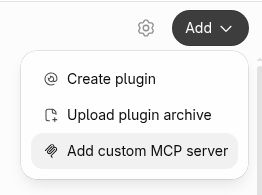
Step 2 · Add a custom MCP server
Choose Add custom MCP server from the Add menu.
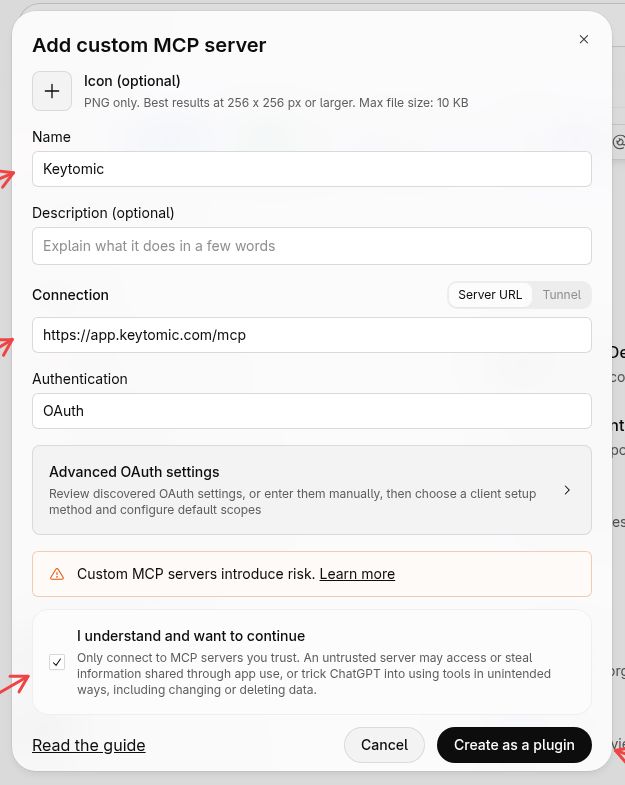
Step 3 · Enter the connection details
Name: Keytomic
Server URL: https://app.keytomic.com/mcp
Authentication: OAuth
Read the notice, select “I understand and want to continue”, then click Create as a plugin. You do not need an API key.
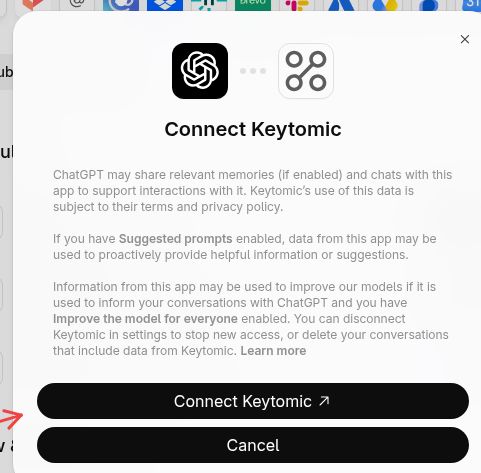
Step 4 · Connect Keytomic
In the Connect Keytomic dialog, click Connect Keytomic to continue to Keytomic sign-in.
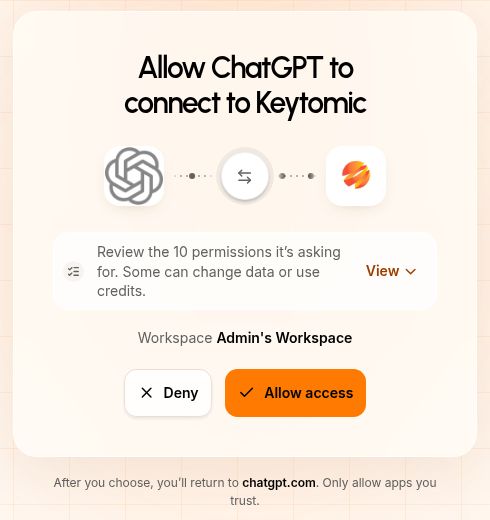
Step 5 · Allow access in Keytomic
Sign in to Keytomic if asked. Check the workspace and requested permissions, then click Allow access. You will return to ChatGPT.
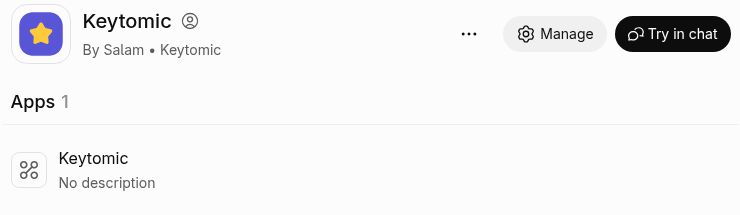
Step 6 · Open a chat with Keytomic
On the Keytomic plugin page, click Try in chat.
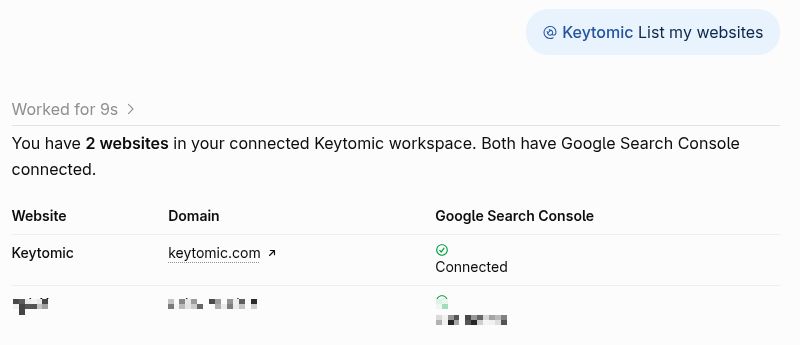
Step 7 · Test the connection
Send this prompt: “Use Keytomic and list my websites.”
ChatGPT should list the websites in your connected Keytomic workspace. If Search Console is connected to a site, its connection can appear in the results.
If Add custom MCP server is not available, check whether your ChatGPT plan and workspace settings allow custom MCP connections, or ask your workspace administrator.
04 / CLAUDE
Connect Keytomic MCP to Claude
Connect through the Claude directory, then sign in to your Keytomic account. Select any screenshot to view it larger in a new tab.
Step 1 · Find Keytomic and connect
Open the Keytomic page in the Claude directory, or search the directory for Keytomic. Click Connect beside Keytomic.

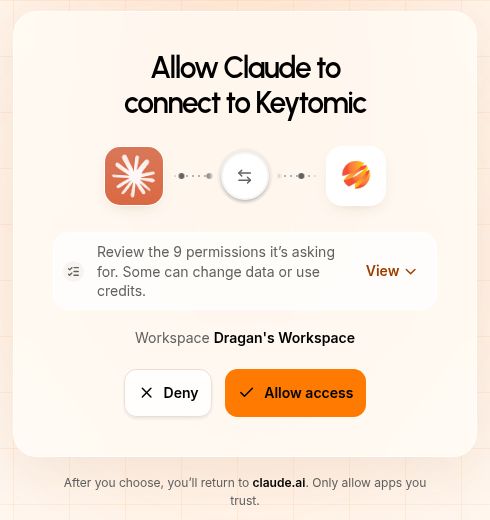
Step 2 · Allow access in Keytomic
Sign in to Keytomic if asked. Check the workspace and requested permissions, then click Allow access. You will return to Claude.
Step 3 · Confirm the connection
Back in Claude, Keytomic should show Connected.

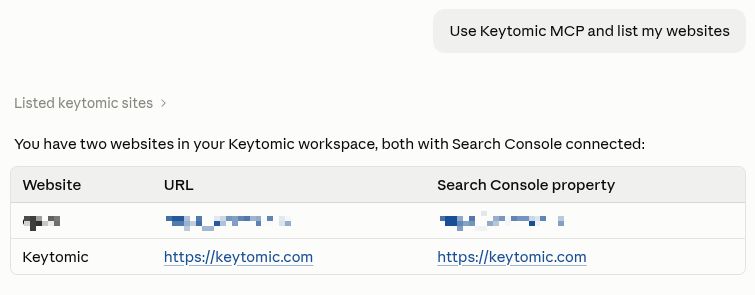
Step 4 · Test the connection
Open a Claude conversation and send: “Use Keytomic MCP and list my websites.”
Claude should list the websites in your connected Keytomic workspace. If Keytomic is not active in the conversation, select it from the Connectors menu.
Prefer to add it manually?
Go to Settings → Connectors → Add custom connector. Name it Keytomic and enter https://app.keytomic.com/mcp. Click Connect, sign in, and choose Allow access. Then test the connection by asking Claude to list your websites.
05 / CLAUDE CODE
Connect Keytomic MCP to Claude Code
Add Keytomic MCP from your terminal. You do not need an API key or an access token.
Step 1. Run this command in your terminal.
Terminal
claude mcp add --transport http keytomic https://app.keytomic.com/mcp
Step 2. Start Claude Code and sign in to Keytomic when it prompts you.
Verify the connection
List configured servers
claude mcp list
You can also enter /mcp in Claude Code. Make sure that Keytomic is connected and that its tools are available.
Run your first audit
Example request
Use Keytomic to run an SEO audit of my site. Watch the audit until it is complete, then give me the Website Health score and a list of the findings by category.
Remove the connection
Remove Keytomic
claude mcp remove keytomic
06 / CURSOR
Connect Keytomic MCP to Cursor
Cursor supports remote MCP servers. You can use Keytomic audits and Search Console data from your code workspace.
Step 1 · Open your MCP configuration
Open Cursor Settings, then MCP, then Add new MCP server.
Step 2 · Add Keytomic MCP
Add this to your mcp.json.
mcp.json
{
"mcpServers": {
"keytomic": {
"url": "https://app.keytomic.com/mcp"
}
}
}
Step 3 · Sign in to Keytomic
Sign in to Keytomic when Cursor asks.
Step 4 · Run an audit
Try this prompt:
Run a Keytomic SEO audit of my site and list the technical SEO issues by category. Put the highest-impact fixes first.
Keytomic MCP reports issues and recommended fixes. It does not change your website files and does not apply fixes automatically.
07 / CODEX
Connect Keytomic MCP to Codex
Step 1. Add this to ~/.codex/config.toml.
config.toml
[mcp_servers.keytomic]
url = "https://app.keytomic.com/mcp"
Step 2. Restart Codex and sign in to Keytomic when it prompts you.
08 / GEMINI CLI
Connect Keytomic MCP to Gemini CLI
Step 1. Add this to ~/.gemini/settings.json.
settings.json
{
"mcpServers": {
"keytomic": {
"httpUrl": "https://app.keytomic.com/mcp"
}
}
}
Step 2. Restart Gemini CLI and sign in to Keytomic when it prompts you.
09 / WINDSURF
Connect Keytomic MCP to Windsurf
Step 1. Open the Cascade panel, click the MCPs icon, then Configure.
Step 2. Add this to mcp_config.json.
mcp_config.json
{
"mcpServers": {
"keytomic": {
"serverUrl": "https://app.keytomic.com/mcp"
}
}
}
Step 3. Refresh and sign in to Keytomic when asked.
Other assistants: any assistant that supports remote MCP servers can use the same URL.
10 / AUDIT WORKFLOW
How a Keytomic SEO audit works
Your AI assistant uses Keytomic tools to start an audit and read its results. The work has four stages.
1 · Start the audit
Your assistant starts an audit of the saved domain of your project. If an audit of that project is already in progress, Keytomic gives that audit and does not start a second audit.
2 · Check audit progress
Your assistant follows the audit until it stops. Keytomic sends the crawl progress and the result of each category when that category is complete.
3 · Get the audit summary
When the audit is complete, Keytomic gives the Website Health score and the Category Health score of each category. It also gives the PageSpeed scores and the top 20 findings.
4 · Review individual issues
Ask for one category, for all the findings, or for the evidence of one finding. Each finding has a severity, the affected items, the reason that it is important, and a recommended fix. Long lists come in pages. Your assistant uses the cursor in the result to get the next page.
Keytomic keeps your audits in your project. Your assistant can find earlier audits and compare them.
11 / COPYABLE PROMPTS
Prompts to try with Keytomic MCP
Start with a full audit, or ask about one area. Each prompt uses the data of your Keytomic project.
Run a full website audit
Using Keytomic, run an SEO audit of my site. Watch the audit until it finishes. Show me the Website Health score and the score and finding count of each category.
Find crawlability issues
Run a Keytomic SEO audit of my site and list all the crawlability findings. Include the severity, the description, and the affected URLs. Get the next pages of results if there are more.
Check indexability problems
Use Keytomic to show me the indexability findings of my latest audit. Explain what each finding means and what I must do to fix it.
Check metadata
Use Keytomic to read the Metadata category of my latest audit. Group the findings by severity. Include the affected URLs and explain how to fix each problem.
Prioritize technical SEO fixes
Read all the findings of my latest Keytomic audit. Make a list of fixes in order of severity and the number of affected pages. Tell me which fixes to do first.
Review overall SEO health
Use Keytomic to give me a simple health report of my site: the Website Health score, the category scores, the most important technical problems, and the next steps.
Check an existing audit
Using Keytomic, list the audits of my site. Tell me the status of the latest audit and its crawl progress.
Get every finding from a completed audit
Using Keytomic, get all the findings of my latest completed audit. Follow the cursors until you have every finding. Group the findings by category and severity.
Find quick-win keywords
Using Keytomic, read my Search Console data for the last 28 days. List the queries just below page 1 with real impressions. For each query, give me the ranking page and the one change to make.
Catch pages that lose traffic
Using Keytomic, compare my last 28 days in Search Console with the 28 days before. List the pages and queries that lost the most clicks or positions, and tell me the likely cause.
Find keyword cannibalization
Using Keytomic, find the queries where two or more of my pages compete. For each query, tell me which page must win and what to do with the other pages.
Submit my sitemaps
Using Keytomic, show me the status of my sitemaps in Search Console. Then sync my sitemaps to Google.
Tip
You can ask follow-up questions about a completed audit. You do not need to start a new audit. Keytomic keeps your audits. Your assistant can read earlier results when you ask.
12 / TOOL REFERENCE
Keytomic MCP tools reference
Keytomic MCP has four families of tools. Your assistant selects the correct tool. You do not need to use the tool names.
SEO Audits
Tool
What it does
start_audit
Starts an SEO audit of the saved domain of a project. If an audit is already in progress, it gives that audit.
watch_audit
Follows an audit and sends each change in its progress until the audit stops.
get_audit
Gives one audit, by default the latest: status, crawl progress, Website Health score, category scores, PageSpeed scores, and the top 20 findings.
list_audits
Lists the audits of a project, newest first.
get_audit_category
Gives the report of one category of a finished audit: each check, its status, its findings, and its limitations.
list_audit_findings
Lists all the findings of a finished audit, with severity, the reason that each finding is important, and the recommended fix.
list_audit_check_rows
Lists all the rows of one check, for example each page that the check flagged.
list_audit_evidence
Lists all the evidence of one finding, for example each page or image that it affects.
list_audit_pages
Lists the URLs that the audit found, with crawl state, HTTP status, title, H1, word count, and depth.
list_audit_links
Lists the links that the audit found, with source page, target URL, anchor text, HTTP status, and link state.
Search Console insights
Tool
What it does
get_search_performance
Gives clicks, impressions, CTR, and average position for a period, compared with an earlier period.
list_top_rankings
Lists the pages or queries with the most clicks or impressions.
list_new_rankings
Lists the pages or queries that started to appear in Google Search.
list_improving
Lists the pages or queries that gain positions, clicks, or impressions.
list_declining
Lists the pages or queries that lose positions, clicks, or impressions.
list_low_hanging_fruits
Lists the pages or queries that rank just below the top results and are the easiest to improve.
list_underperforming
Lists the pages or queries that get fewer clicks than their position must give.
list_cannibalization
Lists the queries where two or more pages of the site compete.
list_zombie_pages
Lists the pages in your sitemaps that got no Google impressions.
list_question_queries
Lists the queries in question form, which show what people ask.
Search Console raw data and sitemaps
Tool
What it does
search_analytics_query
Runs a Search Analytics query on the connected property, with dimensions and filters as in the Search Console API.
inspect_url
Gives the Google index status of one URL.
inspect_urls
Gives the Google index status of a maximum of 50 URLs in one call.
get_property
Gives the connected Search Console property and the permission level of the Google account on it.
list_sitemaps
Lists the sitemaps in Search Console, with errors, warnings, and URL counts.
get_sitemap
Gives the Search Console details of one sitemap.
list_sitemap_urls
Reads a sitemap from your site and lists its page URLs.
submit_sitemap
Submits one sitemap URL to Google.
sync_sitemaps
Submits all the sitemaps that Keytomic found on your site to Google.
Workspace settings
Tool
What it does
list_sites
Lists the projects that your account can open.
get_project
Gives the name, domain, and brand profile of a project.
get_project_settings
Gives the Article Settings, indexing settings, author profiles, and blog schedule of a project.
get_usage
Gives your plan, your subscription status, and the usage of each limit for a project.
update_brand_profile
Saves edits to the brand profile of a project.
create_author_profile
Adds an author profile to a project.
update_author_profile
Changes an author profile.
delete_author_profile
Deletes an author profile.
set_default_author_profile
Makes an author the default author of a project.
update_article_settings
Saves edits to the Article Settings of a project.
update_indexing_settings
Saves the URL prefix of the posts of a project.
Next release: Content calendar tools come with the next Keytomic release.
13 / LIMITS
Keytomic MCP limits and requirements
Keytomic MCP works with the projects in your Keytomic account.
You need a Keytomic account. Keytomic MCP is included in paid Keytomic plans. You can start with a free trial.
Your assistant can open only the projects and data that your Keytomic account can open.
An audit crawls the saved domain of a project. To audit a different site, add it as a project in Keytomic.
Only one audit can run for each project at a time.
The usage limits of your plan apply. Ask your assistant for your usage to see each limit.
Search Console tools need a connected Search Console property on the project.
To submit sitemaps, the connected Google account must have Owner or Full permission on the property.
A URL inspection request can check a maximum of 50 URLs. Google rate limits apply.
Long results come in pages. Your assistant uses the cursor to get the next page.
Keytomic MCP does not change your website content, your code, or your rankings.
The crawler can give limited results if your site blocks crawlers or if the crawler cannot reach your site.
14 / TROUBLESHOOTING
Troubleshooting Keytomic MCP
Keytomic MCP is not connecting
Make sure that you entered the full URL https://app.keytomic.com/mcp. Make sure that your assistant supports remote MCP servers. Your plan or your workspace can block custom connectors. If you see a certificate error, do not continue. Send an email to hi@keytomic.com.
My assistant asks for an API key
Keytomic MCP does not use API keys. It uses OAuth sign-in with your Keytomic account. If your client asks for an authentication type, select OAuth. Then sign in to Keytomic and approve.
I cannot sign in
Make sure that you have a Keytomic account with an active free trial or paid plan. Then disconnect Keytomic in your assistant and connect it again.
My audit is still running
An audit runs in the background. Ask your assistant to watch the audit. Ask for the results when the audit is complete.
The audit results are not ready
Some tools read only a finished audit. Wait until the status of the audit is completed or partial. Then ask again.
I cannot find an earlier audit
Keytomic keeps your audits in your project. Ask your assistant to list the audits of the project.
An audit is already running
Keytomic runs only one audit for each project at a time. If you start a new audit while one is in progress, Keytomic gives the audit that is in progress. Wait until it stops, then start a new audit.
My audit checked fewer pages than I expected
The crawler reads only the pages that it can find and reach. Ask your assistant for the list of pages in the audit. Each URL shows its crawl state: fetched, blocked, inconclusive, failed, or pending.
I can’t see traffic or keyword rankings
Connect Google Search Console to your project in Keytomic. If your assistant reports gsc_not_connected or gsc_reconnect_required, connect or reconnect Search Console in Keytomic.
A sitemap submit fails
The connected Google account must have Owner or Full permission on the Search Console property. If your assistant reports gsc_owner_permission_required, connect a Google account with this permission.
A tool is missing or unavailable
Make sure that your client connected to the server and found its tools. If you did not approve a permission at sign-in, the related tools do not operate. Disconnect Keytomic, connect it again, and approve all the permissions. Content calendar tools come with the next release.
15 / FAQ
Frequently asked questions
Is Keytomic MCP free?
No. Keytomic MCP is included in paid Keytomic plans, at no extra cost. You can start with a free trial.
Do I need a Keytomic account to use MCP?
Yes. Keytomic MCP works with your Keytomic projects. Start a free trial, add your site, and then connect your assistant.
Can I use Keytomic MCP with ChatGPT?
Yes. Open Plugins → Add → Add custom MCP server. Enter https://app.keytomic.com/mcp, choose OAuth, and connect with your Keytomic account. Your ChatGPT plan and workspace settings must allow custom MCP connections.
Can I connect Keytomic MCP to Claude?
Yes. Find Keytomic in the Claude directory, click Connect, then sign in and choose Allow access. You can also add https://app.keytomic.com/mcp manually in Settings → Connectors → Add custom connector.
Can I use Keytomic MCP with Claude Code?
Yes. Run claude mcp add --transport http keytomic https://app.keytomic.com/mcp, then sign in to Keytomic when Claude Code prompts you.
Which other assistants can I use?
Cursor, Codex, Gemini CLI, Windsurf, and all other apps that support remote MCP servers. They all use the same URL.
What does Keytomic MCP check?
It runs a full SEO audit of the saved domain of your project in 15 categories. It also reads the Search Console data of your project.
Can Keytomic MCP audit any website?
It audits the saved domain of each project in your Keytomic account. To audit a different site, add it as a project in Keytomic. The audit can give limited results if the site blocks crawlers or if the crawler cannot reach it.
Can Keytomic MCP check Google Search Console data?
Yes. For a project with a connected Search Console property, it reads queries, clicks, impressions, CTR, average position, and index status. It can also submit sitemaps to Google when you ask.
Does Keytomic MCP automatically fix SEO issues?
No. It reports issues and recommended fixes. It does not change the content, the settings, or the code of your website. When you ask, it can edit your brand profile, author profiles, Article Settings, and indexing settings in Keytomic.
How long are audit results available?
Keytomic keeps your audits in your project. Your assistant can find and read earlier audits when you ask.
Is Keytomic MCP secure?
You sign in with OAuth and approve each permission. Your assistant sees only the projects that your Keytomic account can open. Keytomic MCP cannot read payment details. You can disconnect Keytomic from your assistant when you want.
Can I run multiple audits?
Yes. You can audit each project in your account. Only one audit can run for each project at a time.
Can my teammates use it?
Yes. Each teammate connects with their own Keytomic sign-in. Their assistant sees only the projects that their account can open.
16 / ABOUT
About Keytomic MCP
Keytomic MCP is the remote Model Context Protocol server of the Keytomic SEO platform. The Keytomic team builds and operates it. It gives AI assistants access to your SEO audits, your Search Console data, and your project settings. You do not need to change between tools.
Start your first SEO audit with Keytomic MCP
Start a free trial, add your site, and connect your AI assistant. Then ask for an SEO audit or for the quick wins in your Search Console data. You sign in with your Keytomic account. You do not need an API key.
MCP server URL
https://app.keytomic.com/mcp
Keytomic MCP is included in paid Keytomic plans. For the full Keytomic SEO platform, visit keytomic.com.