 Changelog
Keytomic Product updates
Product release updates
ChangelogKeytomic Product updates
Product release updates
Everything We Shipped in October (Till 19th)
October 2026
This round of updates brings deeper website audits, a clearer Project Overview, more control over articles and images, and new ways to work through your AI assistant. We’re also sharing what is coming next for content improvements and MCP.
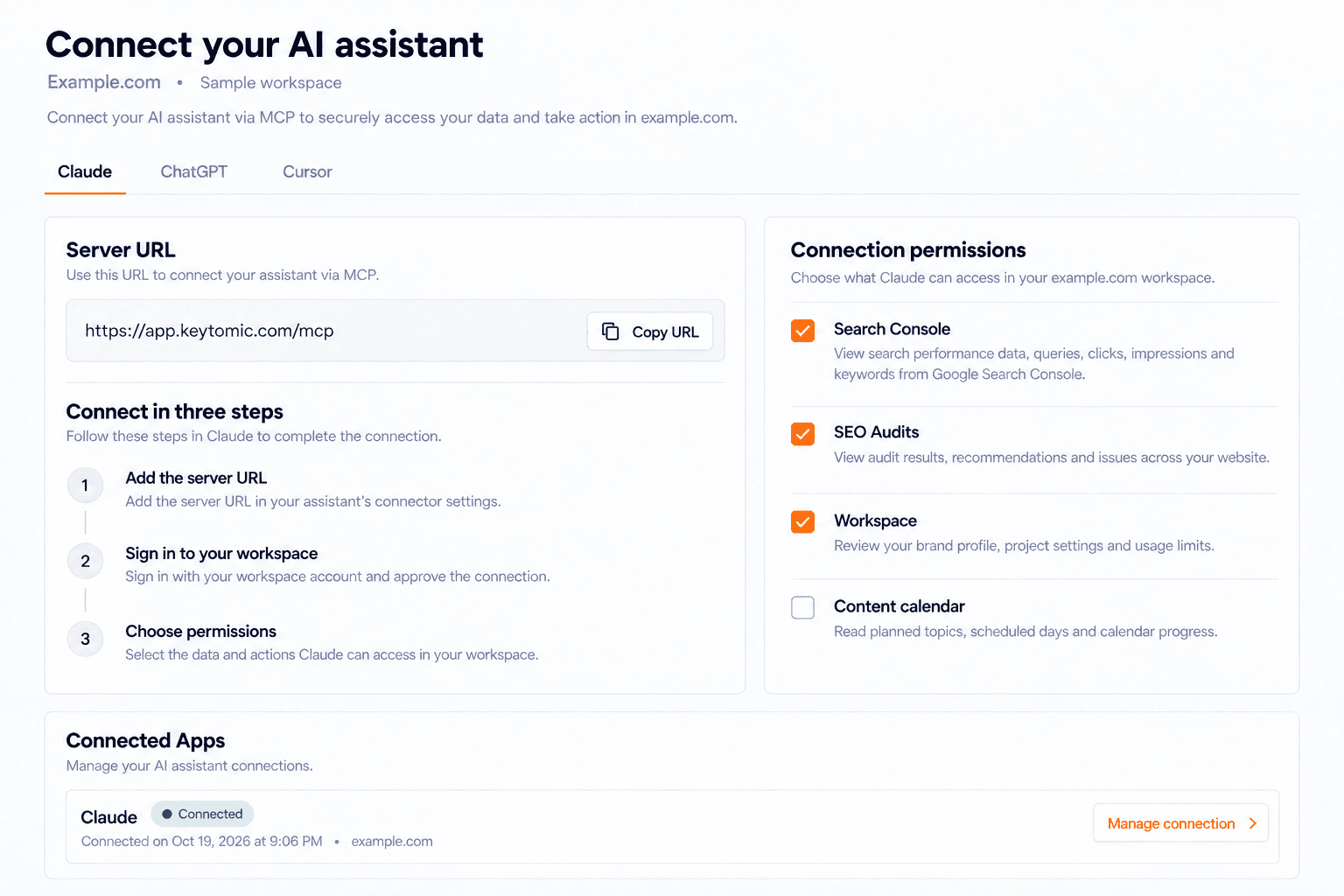
Connect Keytomic to your AI assistant
New Feature · October 19, 2026
Review search performance and act on SEO opportunities without leaving the conversation.
Keytomic MCP connects your workspace to ChatGPT, Claude, Cursor, Claude Code, and other compatible remote MCP clients. Sign in with your Keytomic account, choose the workspace, and approve the permissions your assistant can use. The connection gives your assistant access to your site’s actual project context and search data.
Ask which pages and queries are gaining or losing Google visibility.
Start an SEO Audit, follow its progress, and inspect findings, evidence, affected pages, and recommended fixes.
Review your Brand Profile, author profiles, article settings, calendar topics, and usage limits.
Research related keywords with volume, difficulty, CPC, competition, and monthly trends.
Search Console tools require a connected property. Website audits can run without one. Your workspace permissions and usage limits still apply.
More Search Console insight through MCP
Improvement · October 19, 2026
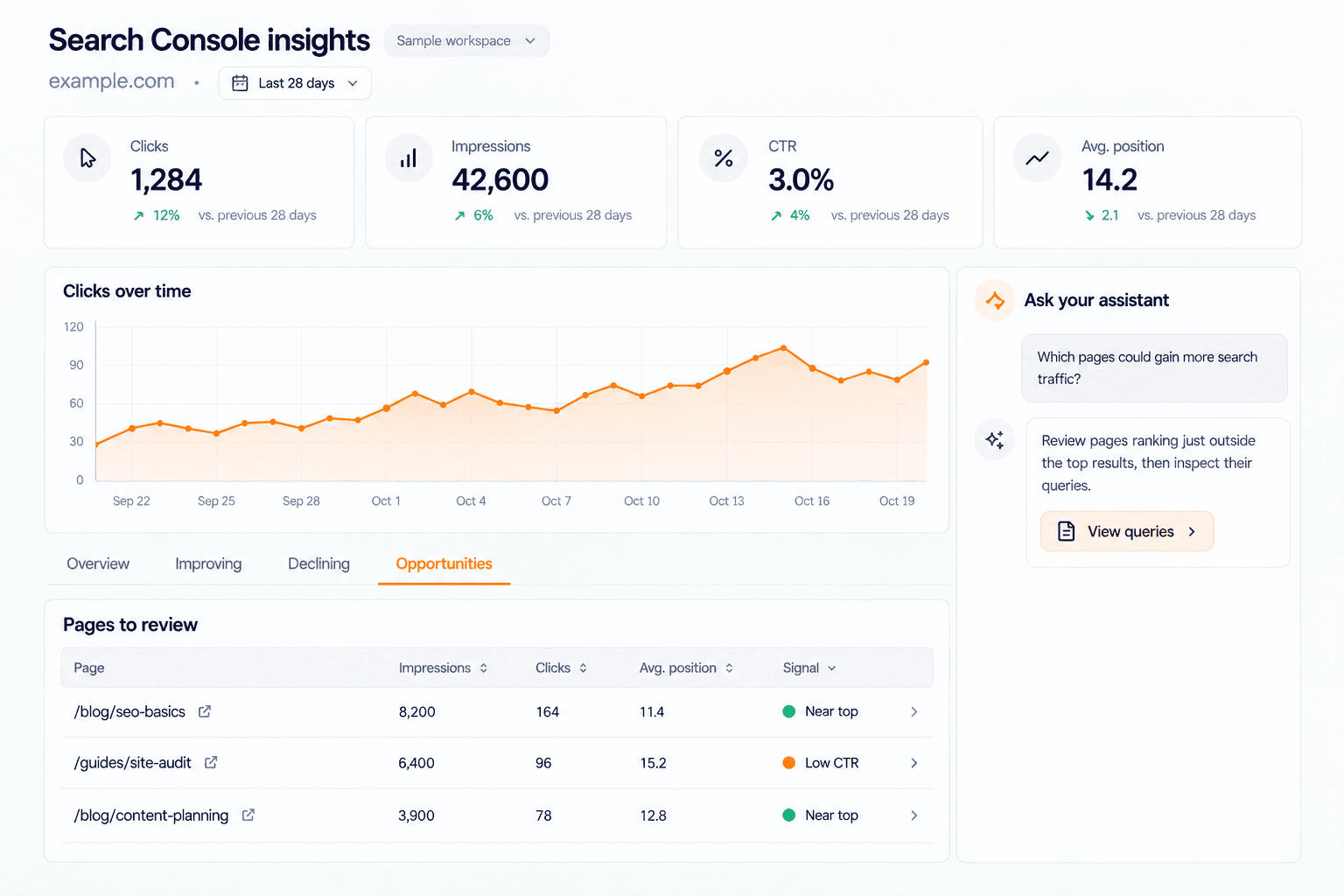
Turn real search data into a clearer next action.
Go beyond a traffic summary. Ask your assistant to compare clicks, impressions, CTR, and average position across periods, then investigate the pages and queries behind the change. The tools cover top and new rankings, improving and declining results, near-top opportunities, and pages receiving impressions but fewer clicks than expected.
Review queries shared by multiple pages as potential overlap signals.
Find submitted sitemap pages with no reported impressions in the observation window.
Discover question queries and longer conversational searches.
Inspect URLs and read, submit, or sync sitemaps through the connected Google property.
These findings provide evidence for content decisions. A shared query is a signal to investigate, rather than proof that two pages serve the same intent.
A new Project Overview
New Feature · October 19, 2026
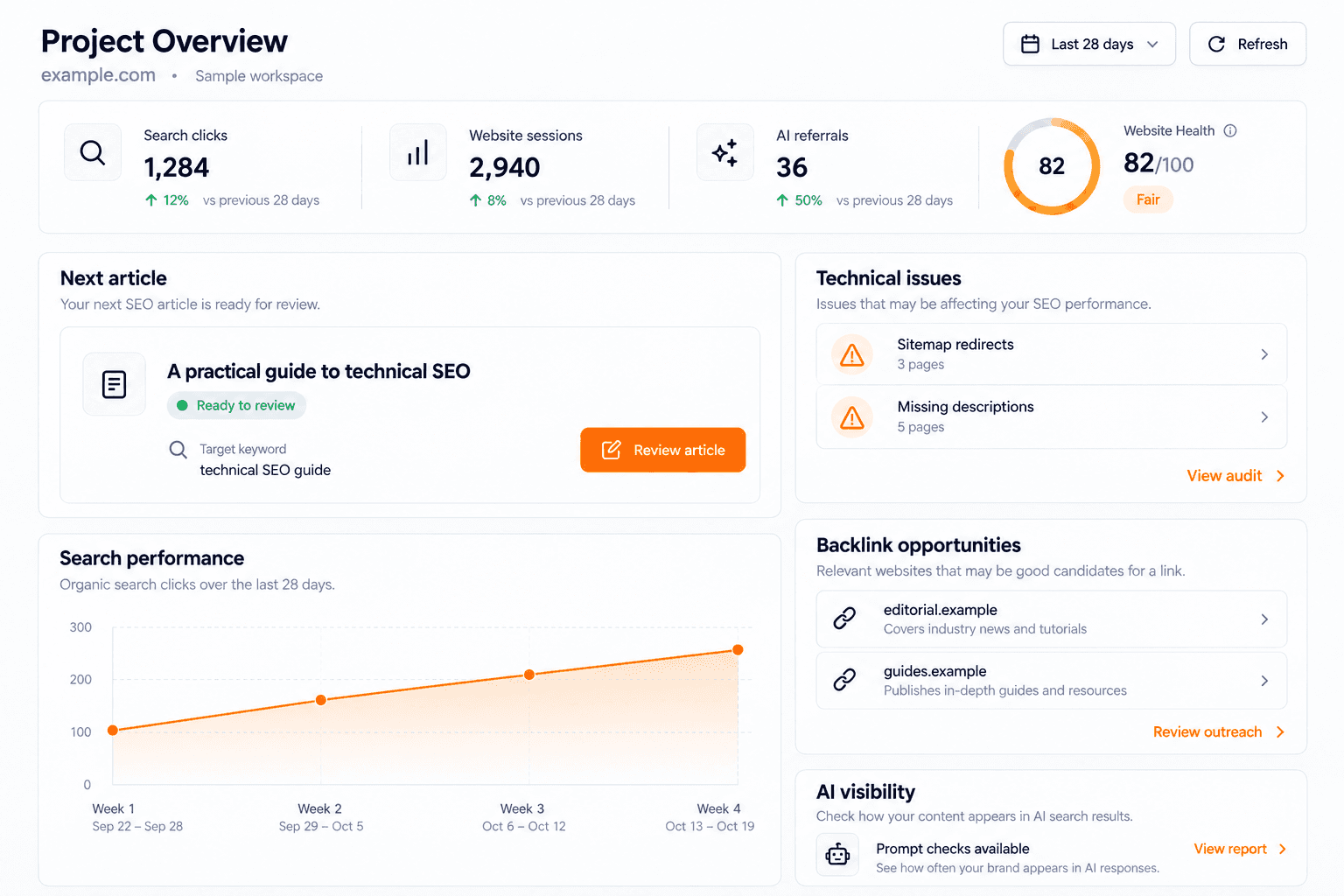
See the state of your SEO work and decide what needs attention next.
The new overview brings content, search performance, website traffic, detected AI referrals, technical issues, and opportunities into one workspace view. Open the next article ready for review, inspect changes in pages and queries, and move into the relevant feature from the finding.
Review the next actionable article and its calendar context.
Compare Search Console and Google Analytics performance over supported periods.
See detected referrals from AI services separately from prompt visibility.
Review saved Website Health, technical issues, backlink opportunities, and Reddit opportunities.
Open an exact audit finding or backlink outreach opportunity from its overview card.
The overview uses available connected and saved data. Missing connections or unavailable evidence remain visible, so an empty metric is not presented as measured performance.
More control over every new article
New Feature · October 19, 2026
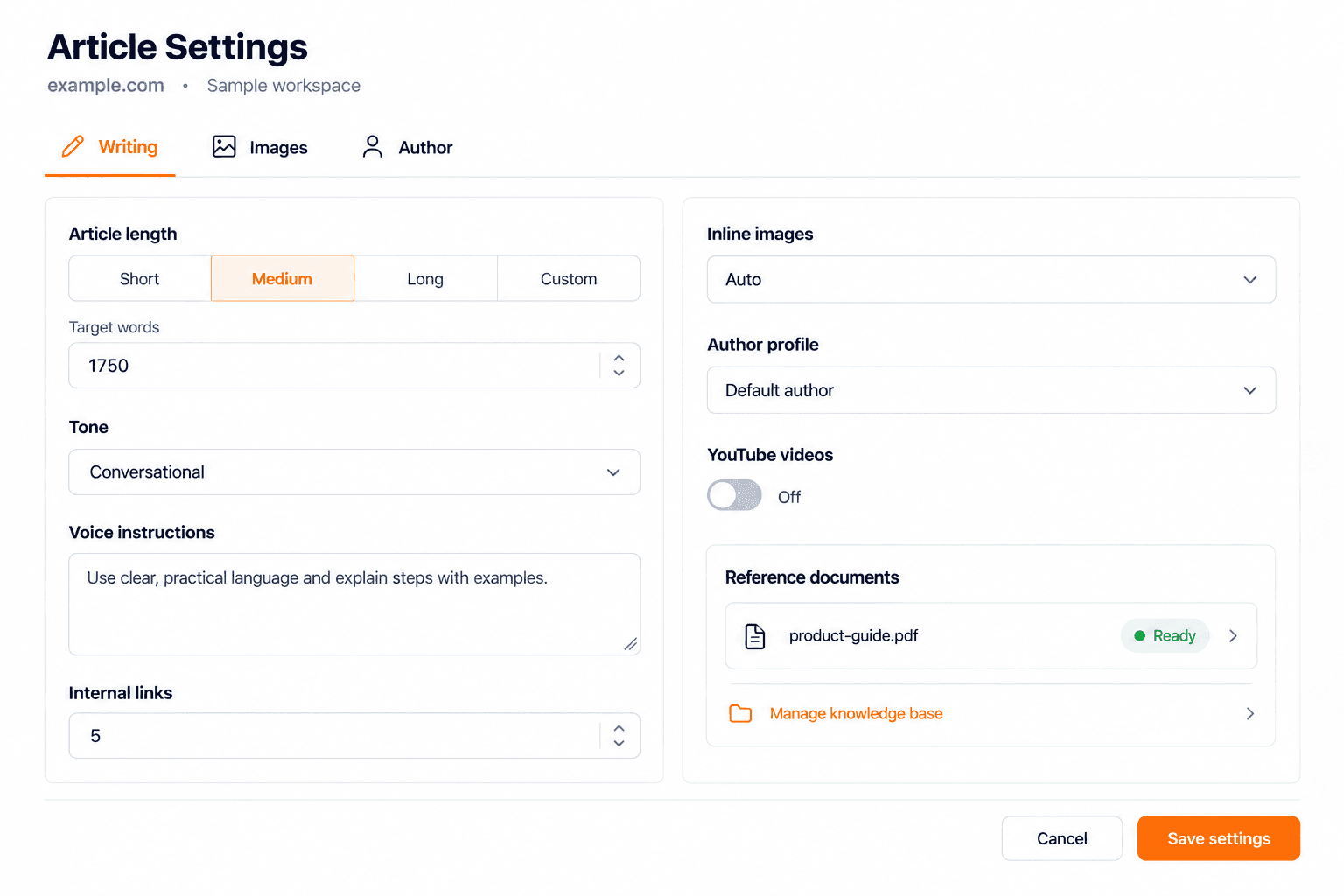
Give Keytomic your preferences before it starts writing.
Article Settings let you choose the target length, tone, voice instructions, internal-link target, inline-image count, author profile, and YouTube preferences. Use project defaults for consistency, then add topic-level instructions when an article needs a particular angle, product reference, or editorial direction.
Choose length presets or a custom target between 600 and 4,000 words.
Set internal-link and generated-image targets, including automatic image selection.
Choose an author and control whether relevant YouTube videos are included.
Supply brand and product reference documents through the Brand Profile knowledge base.
Saved settings and reference material feed the brief and writing workflow, helping you guide the content before review and editing.
Images that match your brand
Improvement · October 19, 2026
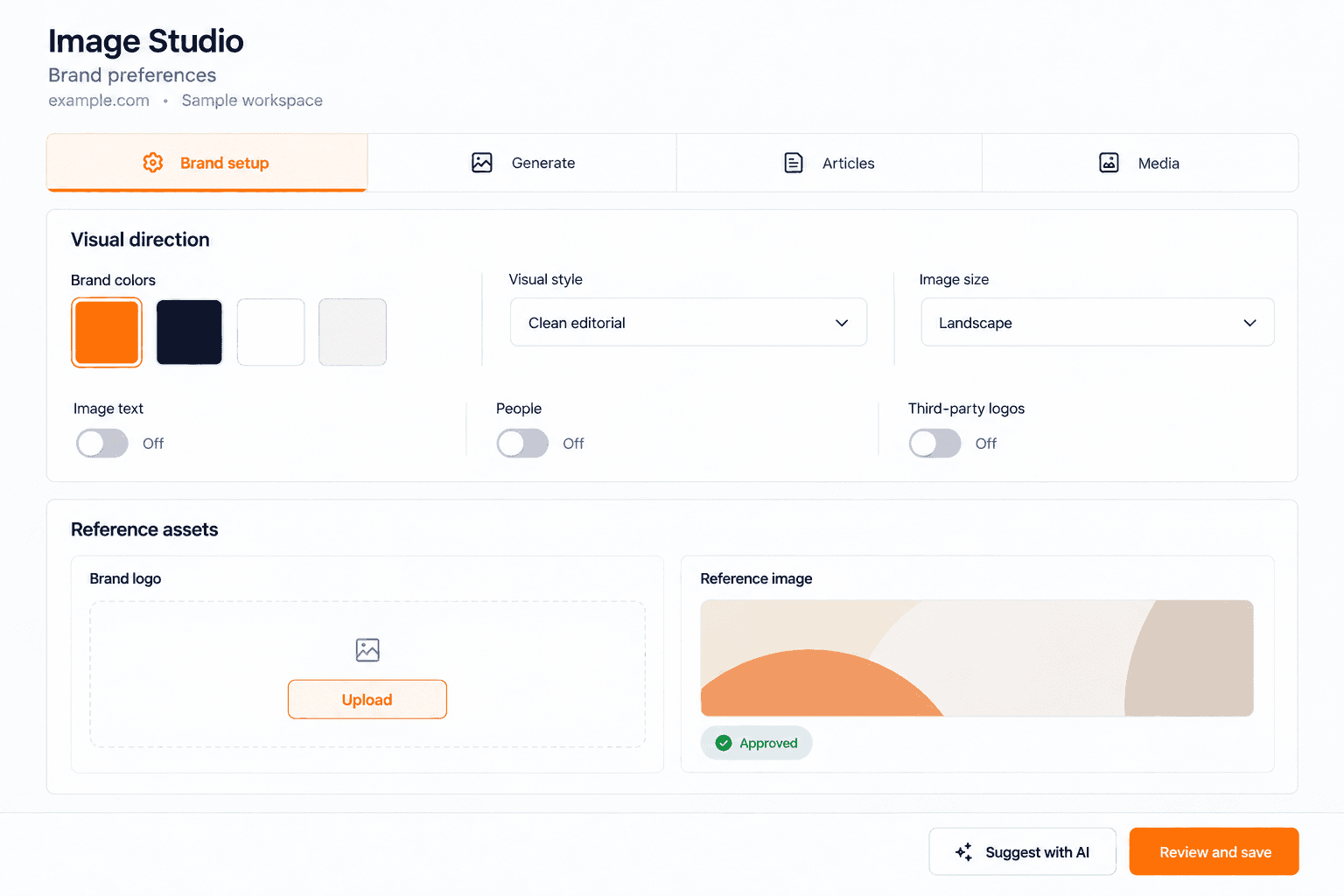
Set the visual direction once, then use it across generated content.
Image Studio setup brings your palette, visual style, approved logo, and reference image together. Start from your saved Brand Profile colors or request suggestions based on your business and stored website screenshot, then review and save the choices yourself.
Set your brand colors and preferred visual style.
Upload and approve a logo and an image reference.
Control image size, image text, people, and third-party logo preferences.
Use AI suggestions while retaining control of your saved brand choices.
The setup is shared with dependent content and image workflows, so generated visuals start from a reviewed direction rather than generic defaults.
Automatic monthly content planning
Improvement · October 19, 2026
Keep the next content plan moving after a successful renewal.
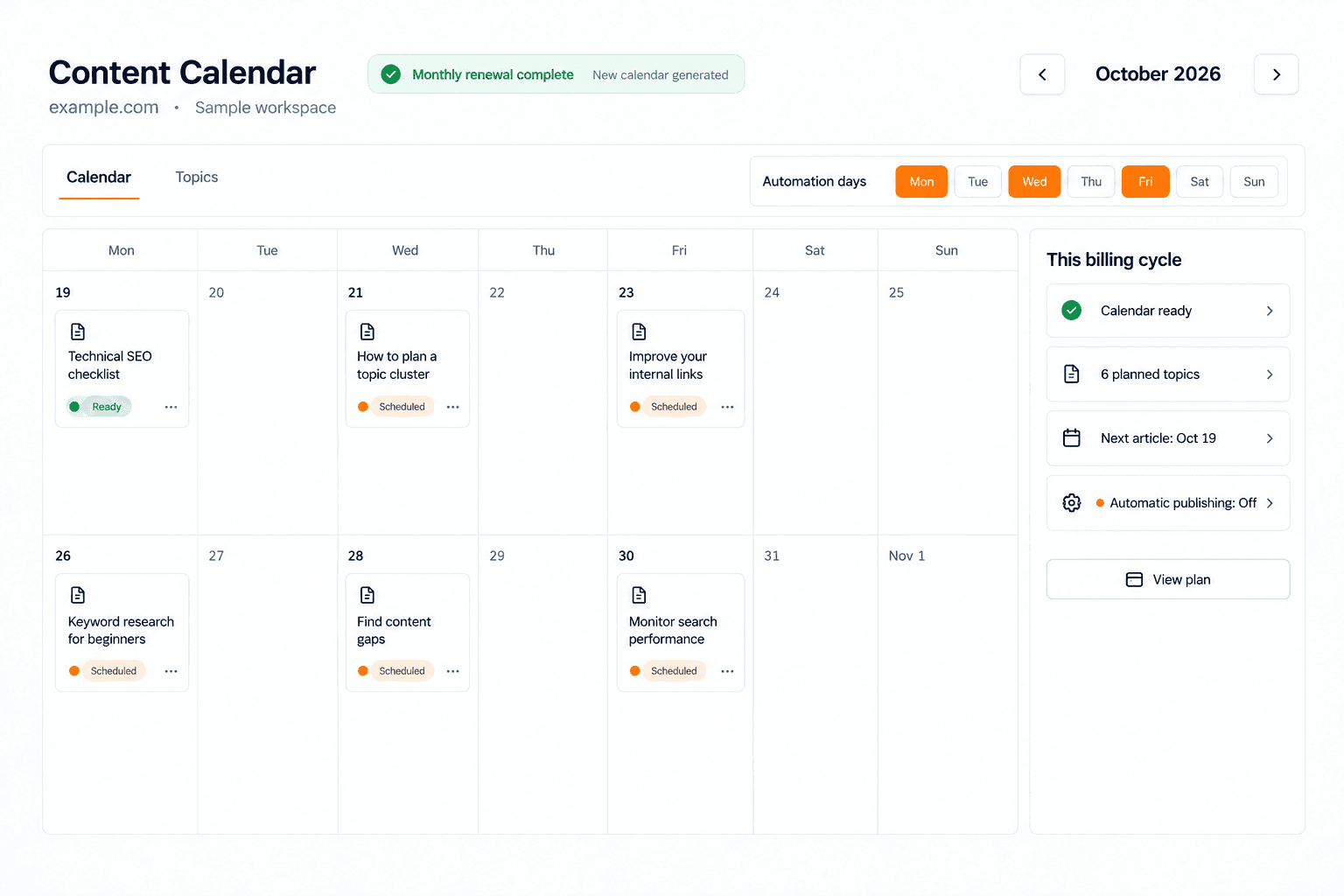
Eligible projects can start a new content-calendar run after a successful paid monthly renewal. The workflow checks project readiness, calendar capacity, existing runs, and the project’s automation days before starting work. Repeated payment notifications do not create duplicate renewal runs.
Generate the next plan after an eligible monthly subscription renewal.
Use the project’s configured automation days within the billing period.
Respect setup requirements, usage limits, and available article capacity.
This is tied to successful monthly renewals. A failed payment, incomplete setup, or a project without usable planning days does not guarantee a new calendar.
Explore automated content planning →
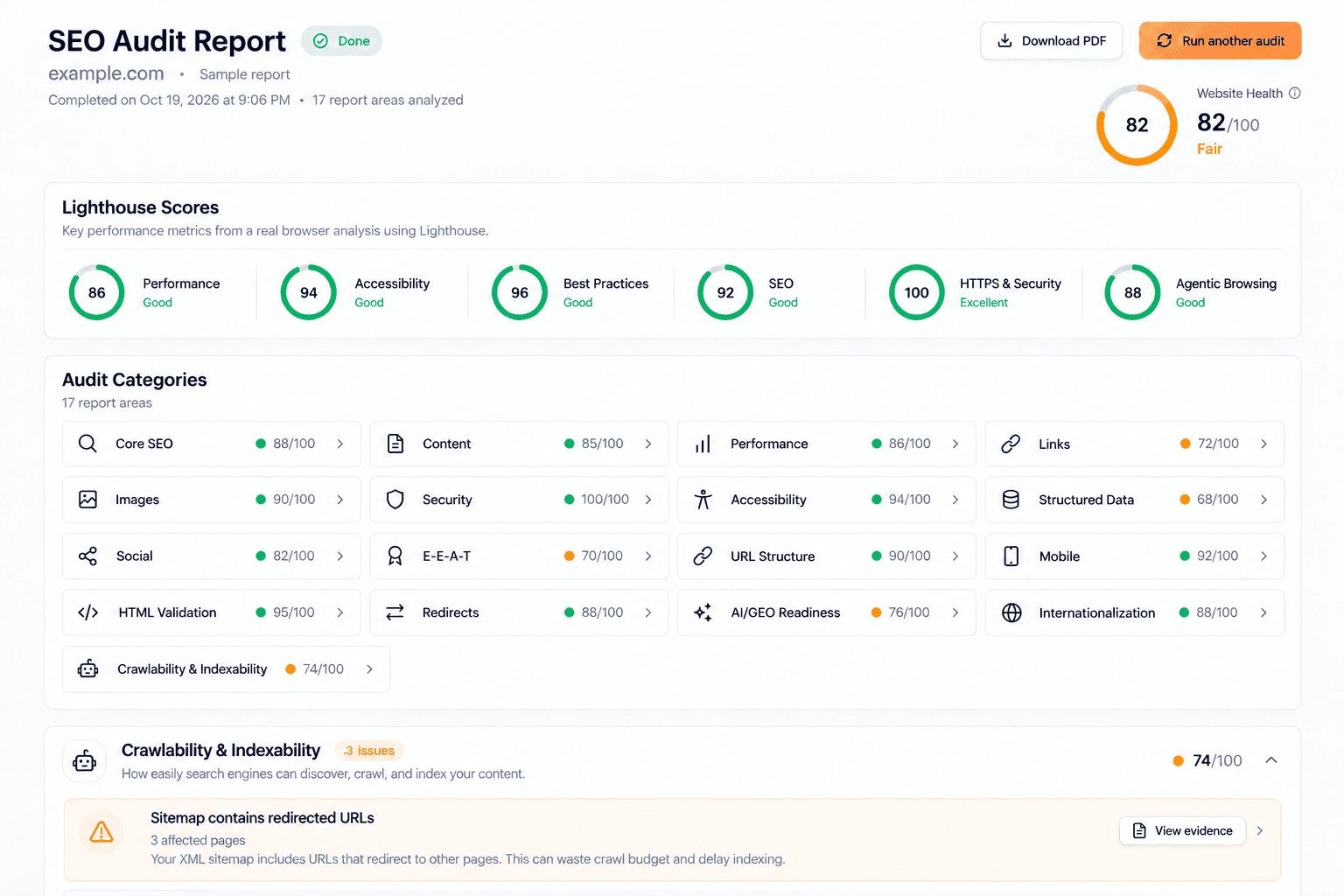
Spot what’s holding your site back. Fix it.
Enhanced Technical SEO Audit · October 19, 2026
Go deeper into the issues that affect discovery, performance, and how your pages can be understood.
The enhanced audit covers 15 technical categories and organizes its findings into 17 report areas. It goes beyond a checklist with Website Health, area scores, affected-page evidence, recommended fixes, and a downloadable PDF report. With PageSpeed enabled, the audit adds Lighthouse testing; coverage varies with the run and the checks that apply.
Review crawling, indexing, robots rules, sitemaps, canonicals, redirects, and site architecture.
Inspect titles, descriptions, headings, content duplication, links, images, and structured data.
Check security, social previews, international signals, and local-search readiness.
Review desktop and optional mobile Lighthouse results, including performance, accessibility, SEO, and Agentic Browsing.
Inspect AI/GEO readiness signals, including AI-crawler access and llms.txt discovery.
Open the evidence behind an issue, identify affected items, and follow its fix guidance.
The crawl catalog contains more than 100 checks, with additional Lighthouse audits when PageSpeed runs. AI-readiness findings describe technical access and structure; they do not promise that an assistant will cite your website.
Run a deeper technical SEO Audit →
Keyword research, connected to your calendar
New Feature · October 19, 2026
Find real search demand and turn selected keywords into planned work.
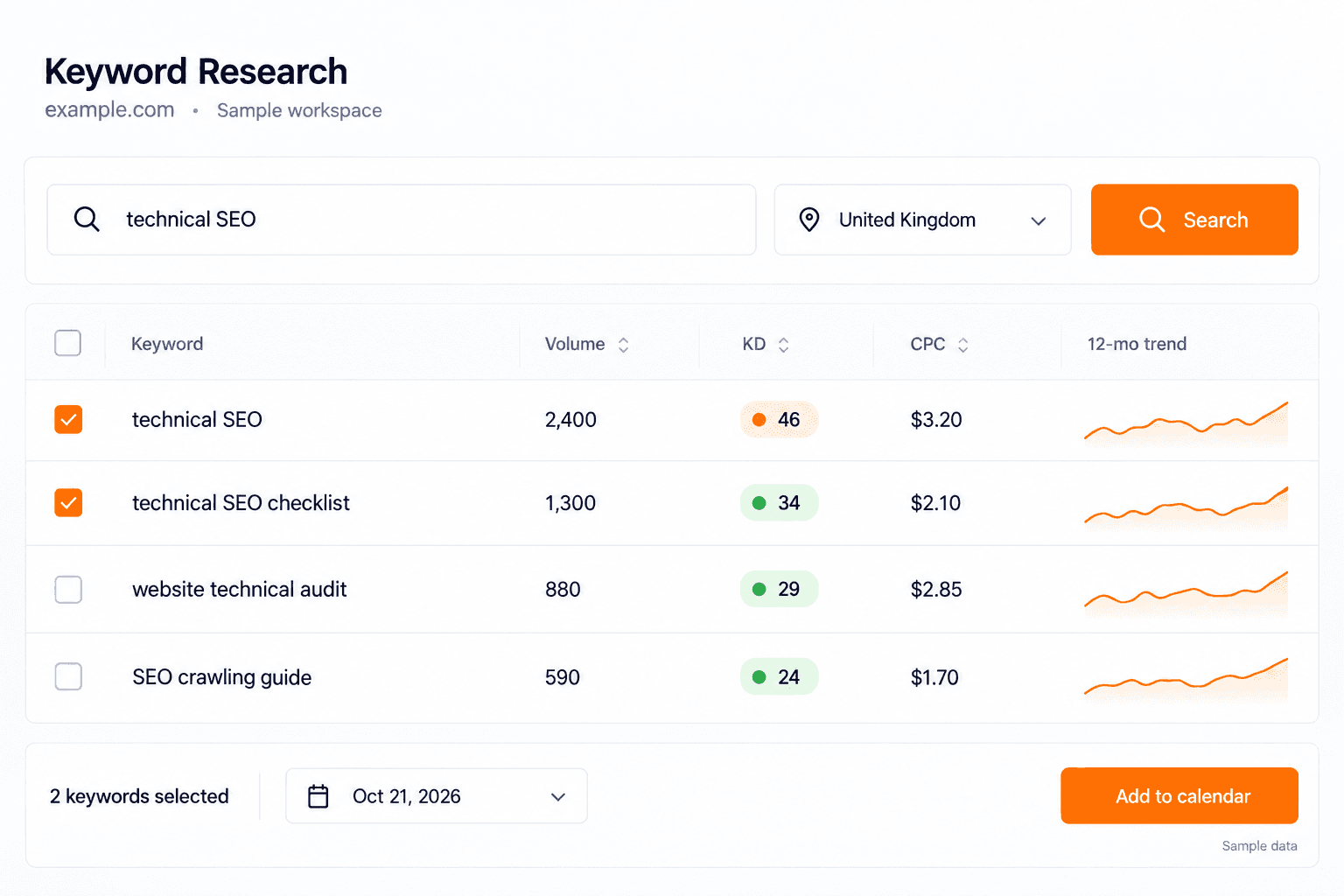
The dedicated Keyword Research page takes a seed keyword and returns related ideas for your project’s market. Compare search volume, keyword difficulty, CPC, and the 12-month trend before choosing what to target. Selected keywords can become calendar topics, with checks for overlap against existing pages and topics.
Review keyword metrics together in one results table.
Select keywords with reported search volume.
Add selected ideas to the calendar on your automation days.
See remaining searches for the project’s monthly allowance.
Backlink and brand outreach with a ready email draft
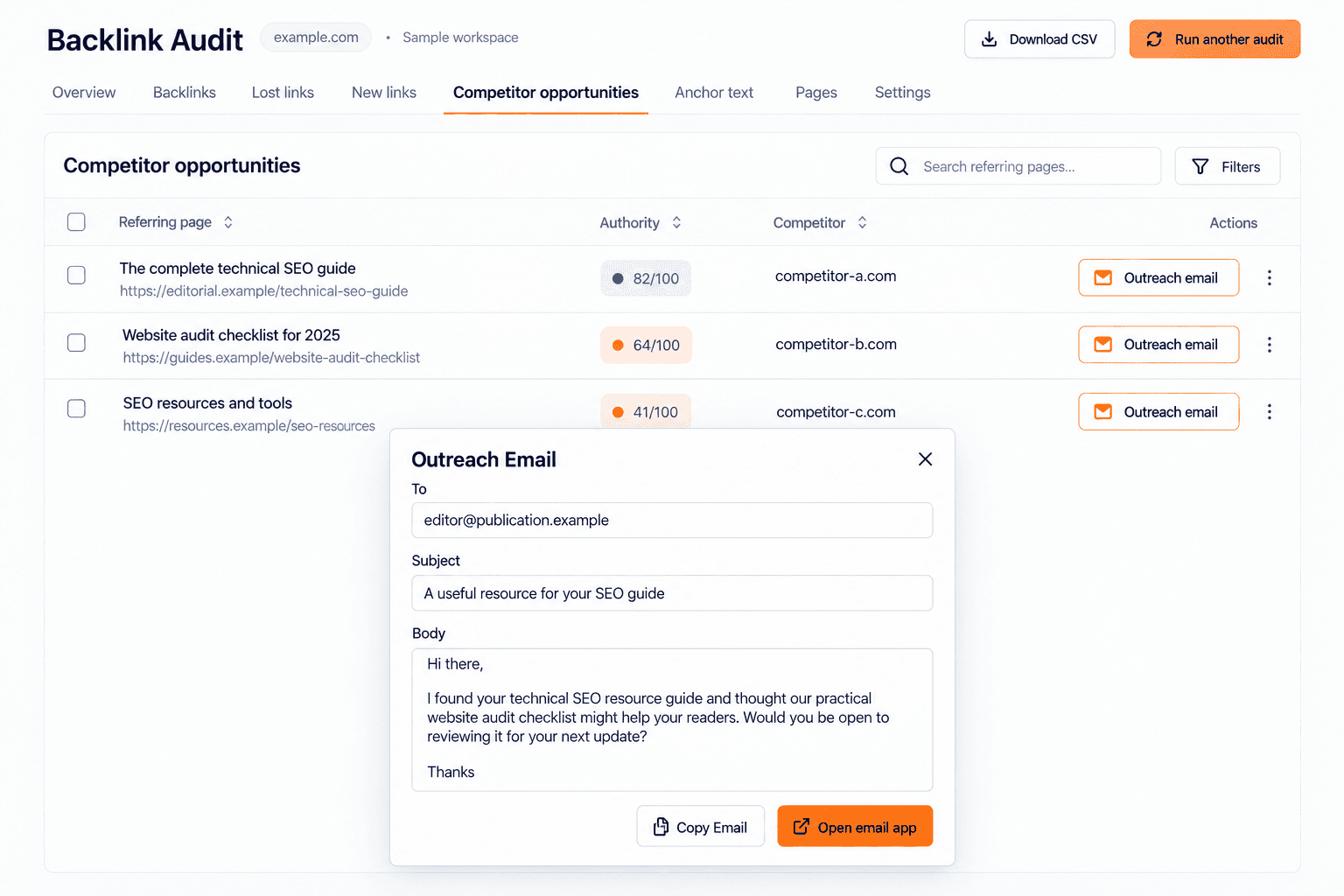
Improvement · October 19, 2026
Move from a competitor link gap to a message you can review.
Backlink opportunities show referring pages that link to competitors, together with the referring domain, page URL, authority metric, and opportunity context. Open Outreach to review the available recipient, subject, and message. Copy the draft or open it in your email app to edit and send.
AI Visibility also supports exporting cited-source opportunities as an outreach CSV. These are starting points for reviewed outreach; Keytomic does not automatically send the emails or guarantee a backlink or brand mention.
Explore backlink opportunities →
AI Visibility: prompts, sentiment, and citations
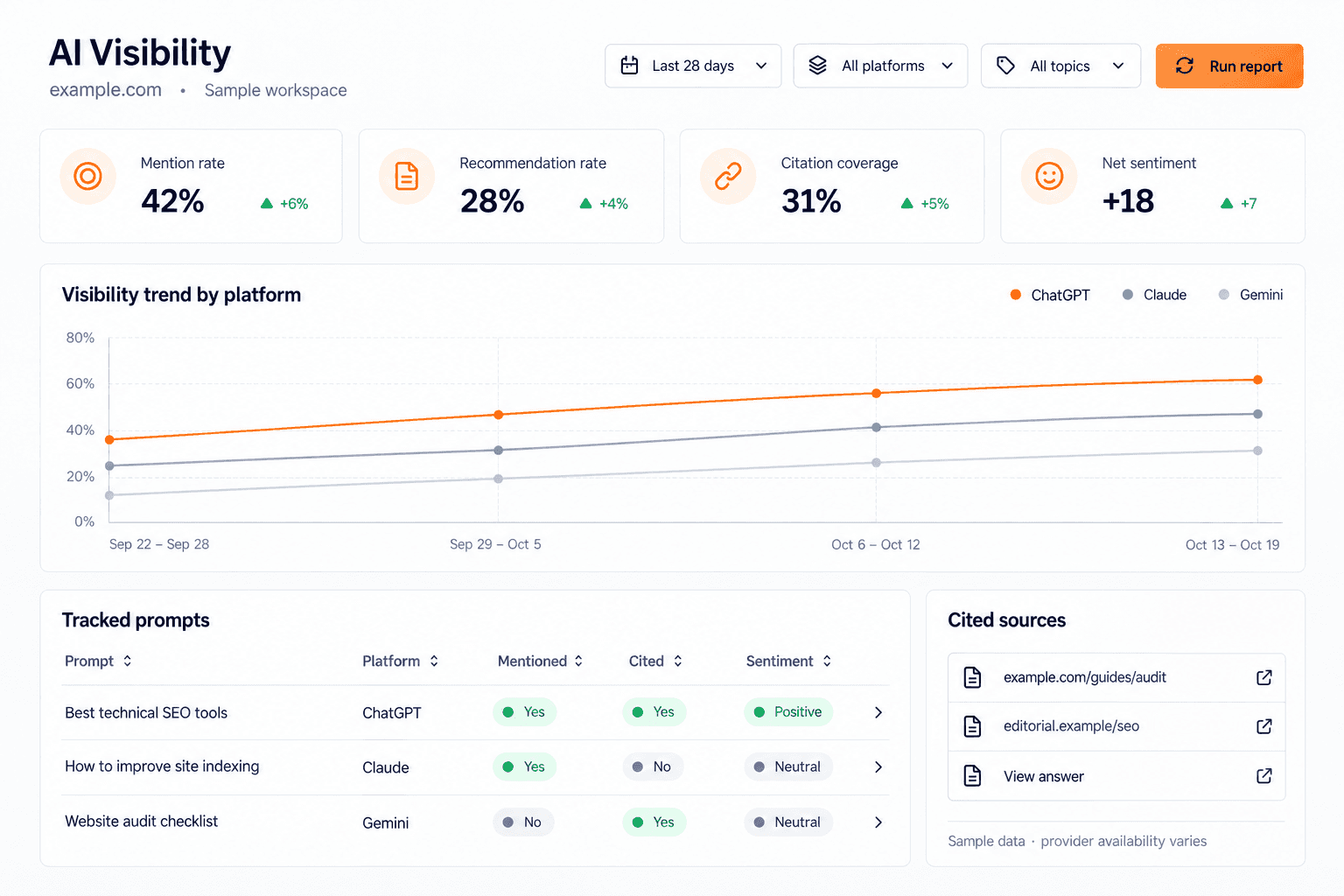
Feature Update · October 19, 2026
Understand where your brand appears and the evidence behind each result.
Track relevant prompts across supported, enabled AI platforms and inspect the saved answers. The report keeps brand mentions, recommendations, retrieved sources, and citations separate, so you can see whether a source was found, cited, or used alongside a brand mention.
Review prompt results by platform, topic, intent, locale, and outcome.
Inspect sentiment, recommendations, competitor comparisons, and cited pages.
Compare visibility trends and source movement across completed checks.
Review sample size and confidence, then export the relevant evidence.
Use evidence-backed opportunities to guide content, audits, or source outreach.
Availability depends on the enabled providers and their supported evidence. AI referral traffic in Analytics and visibility in sampled answers remain different measurements.
In development
Content Improvements: review what to refresh
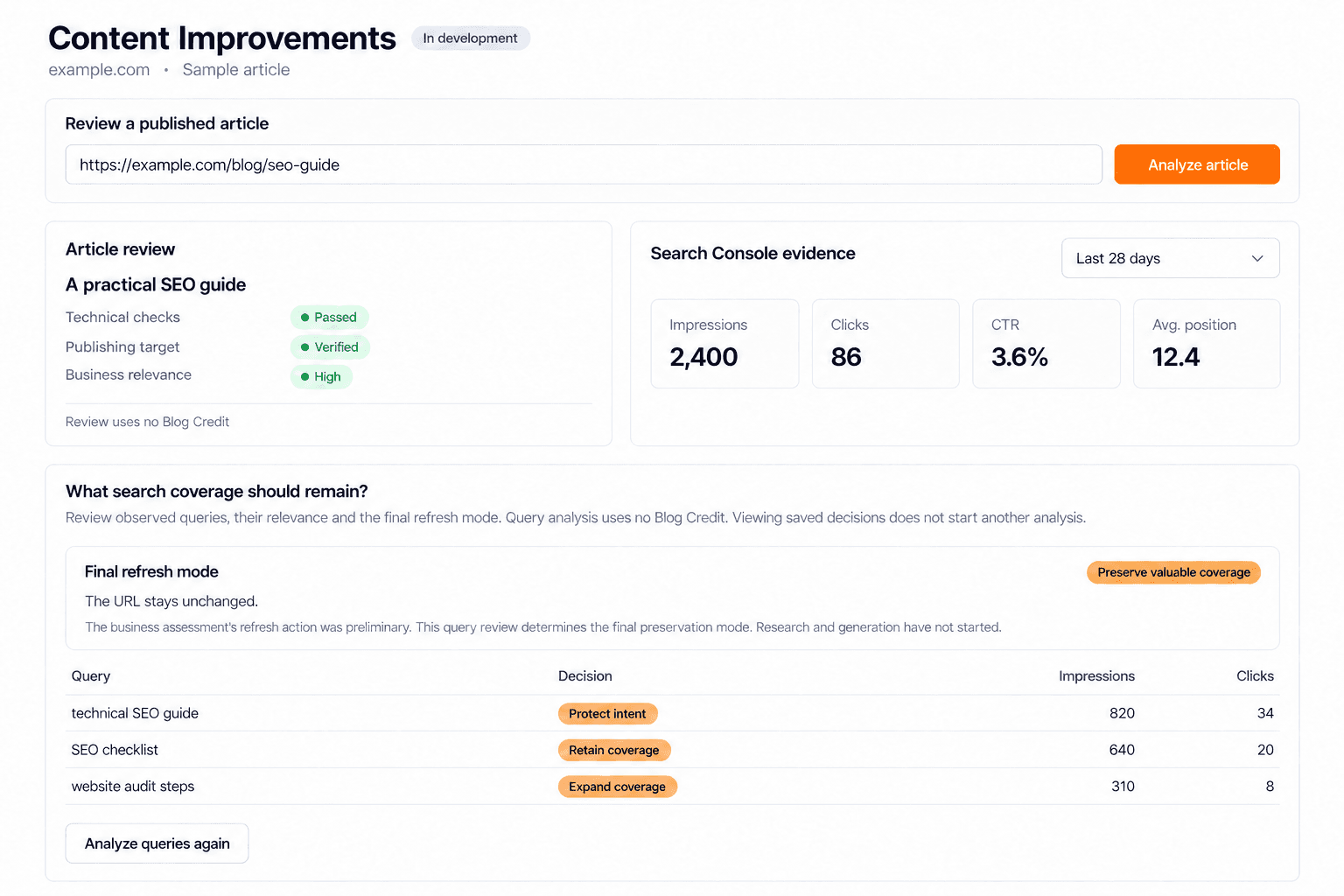
Preview · October 19, 2026
The Content Improvements branch adds review of an existing published article, its Search Console evidence, business relevance, and the queries worth preserving. It can distinguish technical blockers, limited search history, and cases that need a full refresh. A separate opportunity-scan branch is also under review.
Automatic rewriting, update scheduling, and publishing are later work. The current branches do not yet deliver automatic article updates, so this preview should not be read as an auto-update launch.
The next MCP workflows
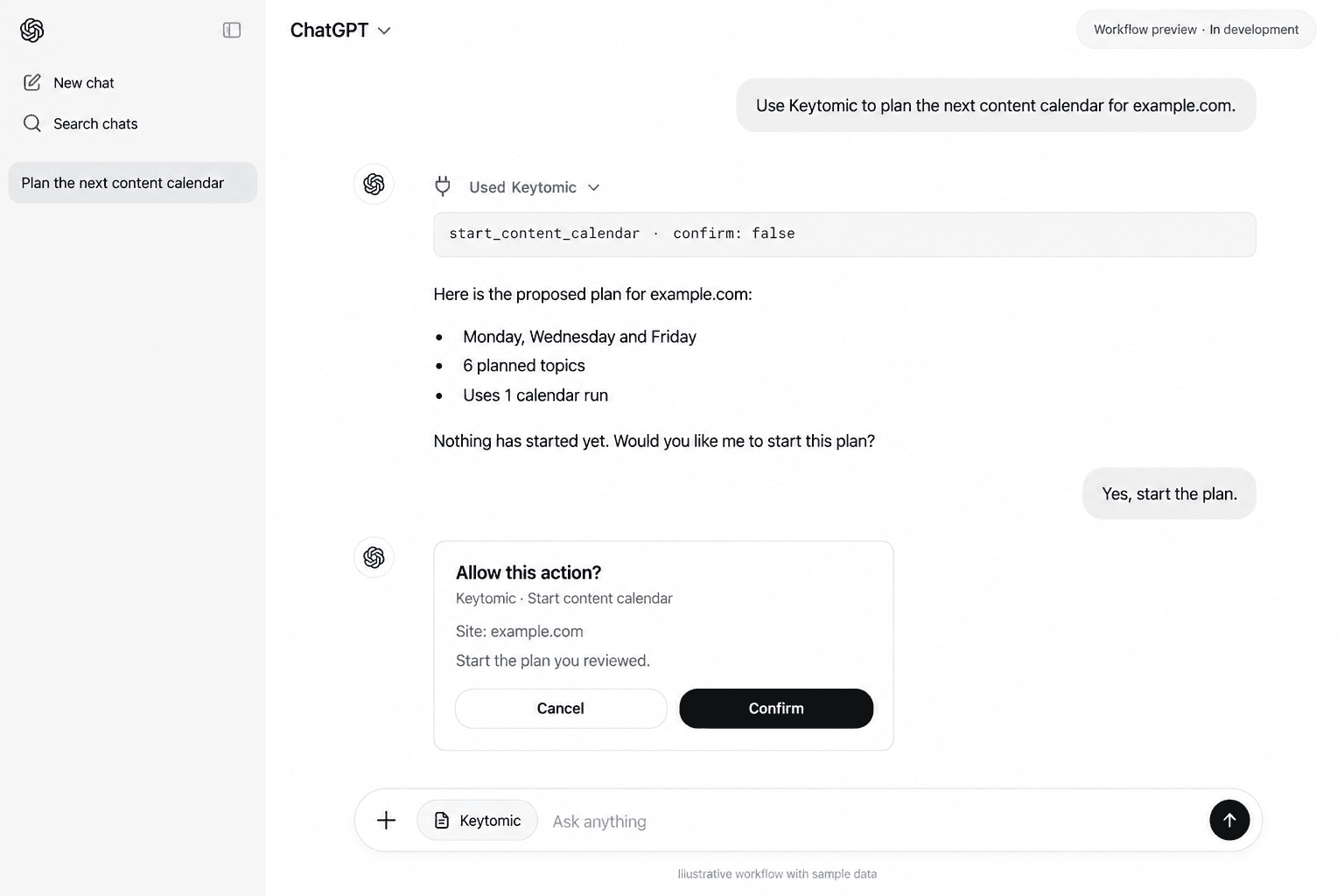
Preview · October 19, 2026
The content-planning release candidate adds topic edits, adding researched keywords to the calendar, creating a topic, and starting a calendar run after reviewing its plan. Scheduled generation and optional publishing then follow your existing project settings.
The analytics and distribution branch currently adds integration-status discovery and scopes for later tools. Direct GA4 performance reads, Bing reads, indexing diagnostics, and Google/Bing indexing submissions remain planned work. Dedicated content-analysis and automatic content-refresh execution are not registered MCP tools in the inspected release.
Everything We Shipped in September (Till 15th)
September 2026
The first half of September brings updates across technical SEO, content planning, editing, Brand Profile, onboarding, mobile, and managed SEO. The focus is simple: less clutter, fewer SEO mistakes, and a faster path from setup to execution.
A more actionable SEO Audit
New Feature · September 1–15, 2026
Find the issues worth fixing without digging through pages that already work.
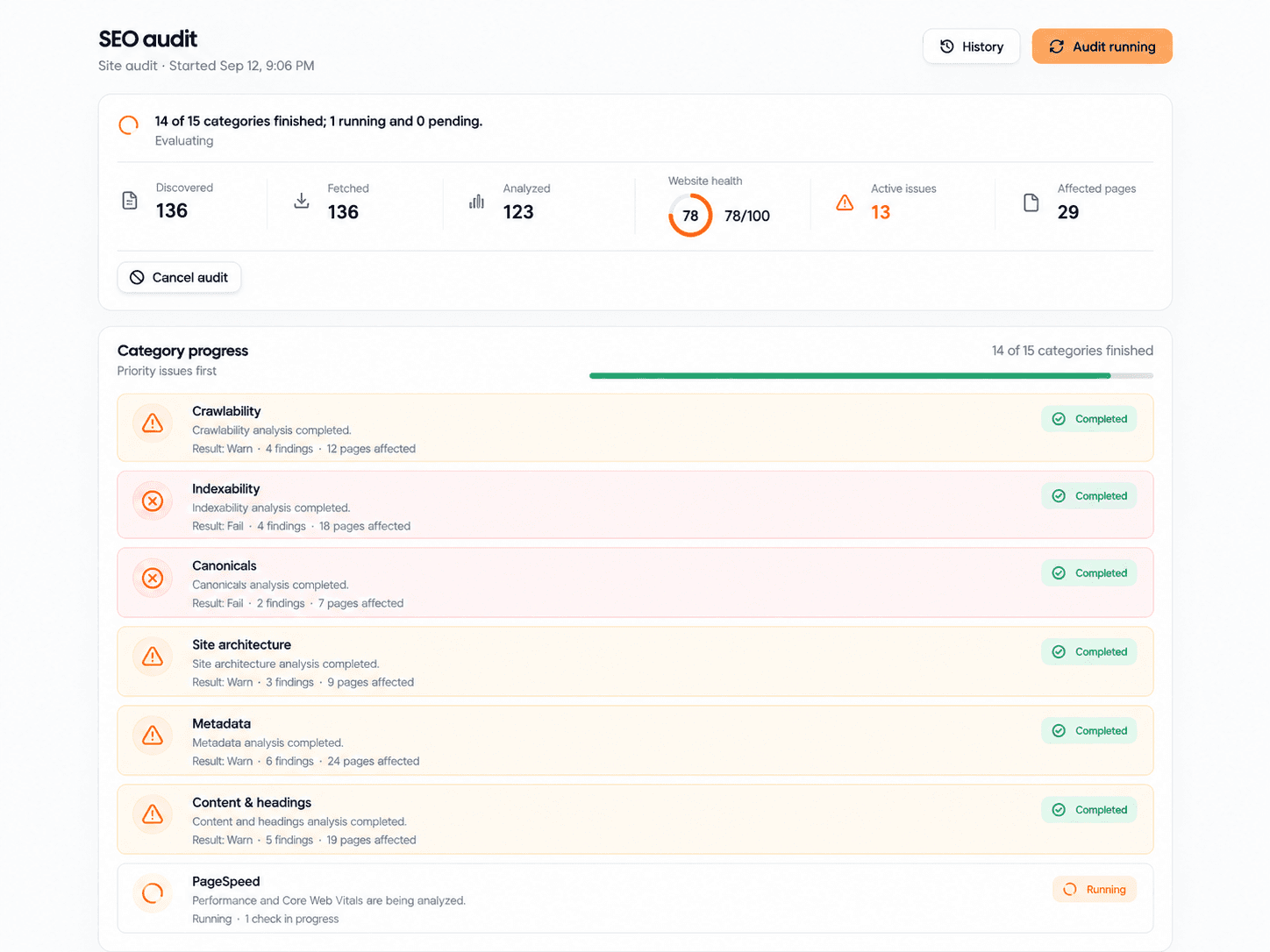
SEO audits can become noisy very quickly. We rebuilt the experience around the issues that need your attention, giving you a clearer starting point for reviewing your website and deciding what to work on next.
What changed
Roughly 40 to 50 high-priority checks keep the audit focused.
Reports surface pages and issues that need action.
A simpler interface organizes crawled pages, errors, and checks.
A website health score gives you an immediate overview.
PageSpeed audits make performance findings easier to review.
Spend less time sorting through healthy pages and more time addressing the findings that matter.
Review the health score first, then use the findings to decide where your attention belongs.
Keyword cannibalization protection in planning
New Feature · September 1–15, 2026
Catch competing topics before you write and publish them.
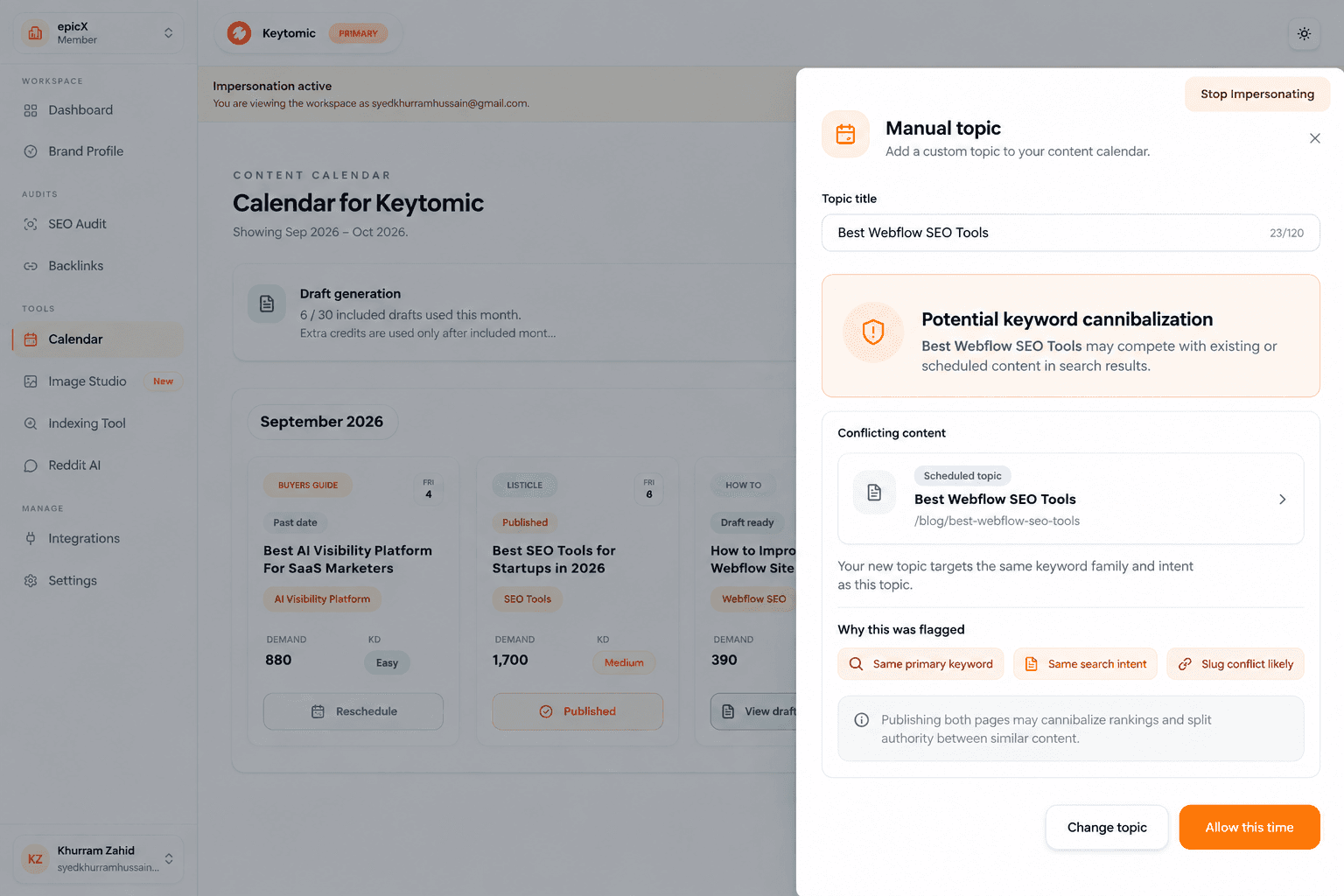
Publishing more content should build authority. It should not create pages that compete with one another. Keytomic now checks for potential cannibalization before topics become part of your content plan.
How it works
Generated calendar topics are checked against one another.
New topics are checked against existing pages found on your website.
Manually added topics are checked against your sitemap and calendar.
Potential collisions can be caught before content is written and published.
This brings overlap checks into planning, when you can still reconsider a topic before investing in another article.
Content Studio, redesigned around the content
New Feature · September 1–15, 2026
More room for the article. Less information competing for attention.
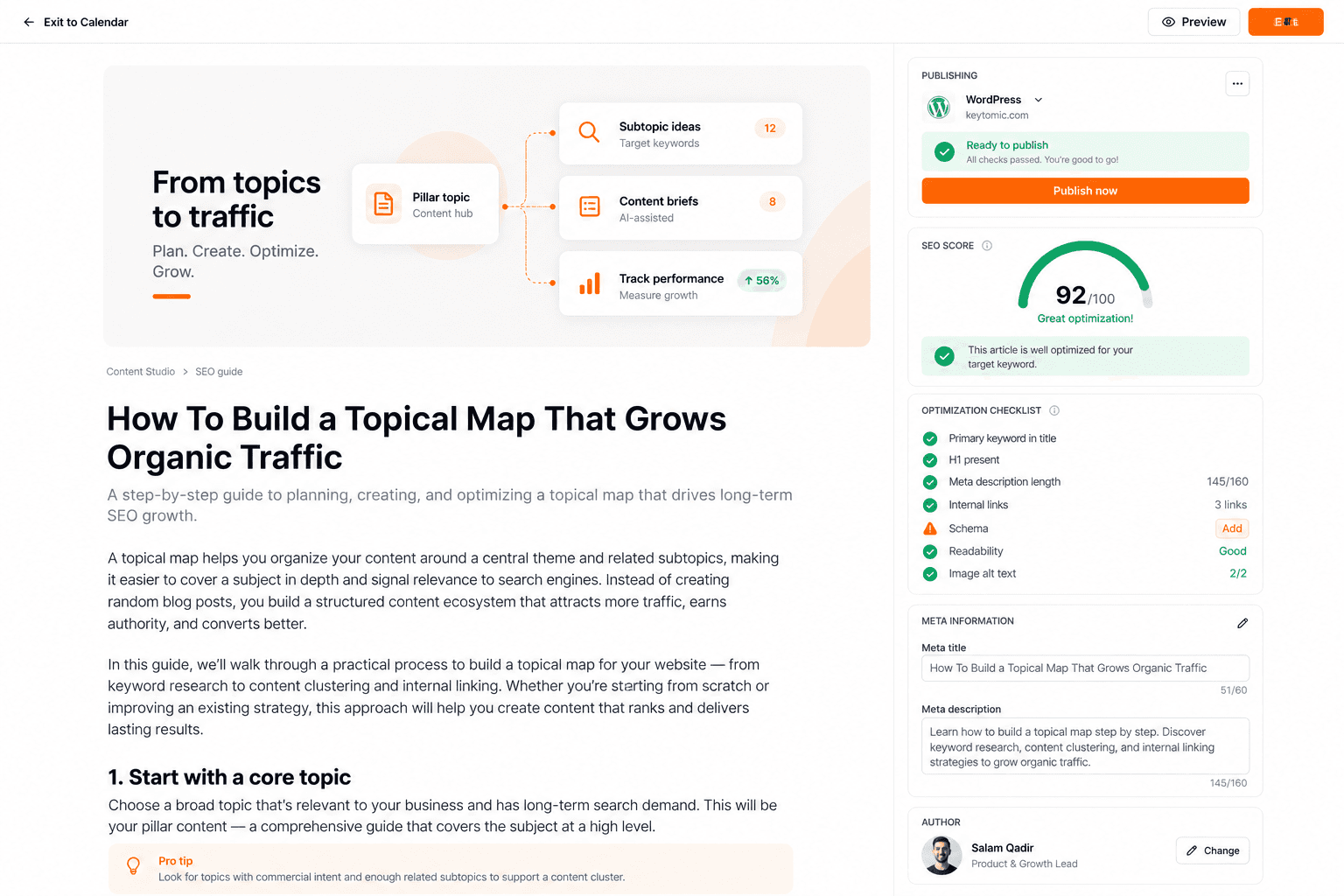
Content Studio had accumulated useful information, but too much of it was competing with the article itself. We reorganized the workspace so reviewing and editing your content becomes the main job on the screen again.
What changed
More space for reviewing and editing the article.
SEO scores, metadata, keywords, publishing information, and supporting metrics are organized by priority.
Secondary information stays accessible without taking over the workspace.
Refined scoring, banners, and a sticky toolbar support a cleaner editing flow.
Keep your attention on the draft while retaining access to the details that support publishing.
A cleaner Brand Profile experience
Improvement · September 1–15, 2026
Manage your brand context with less visual clutter.
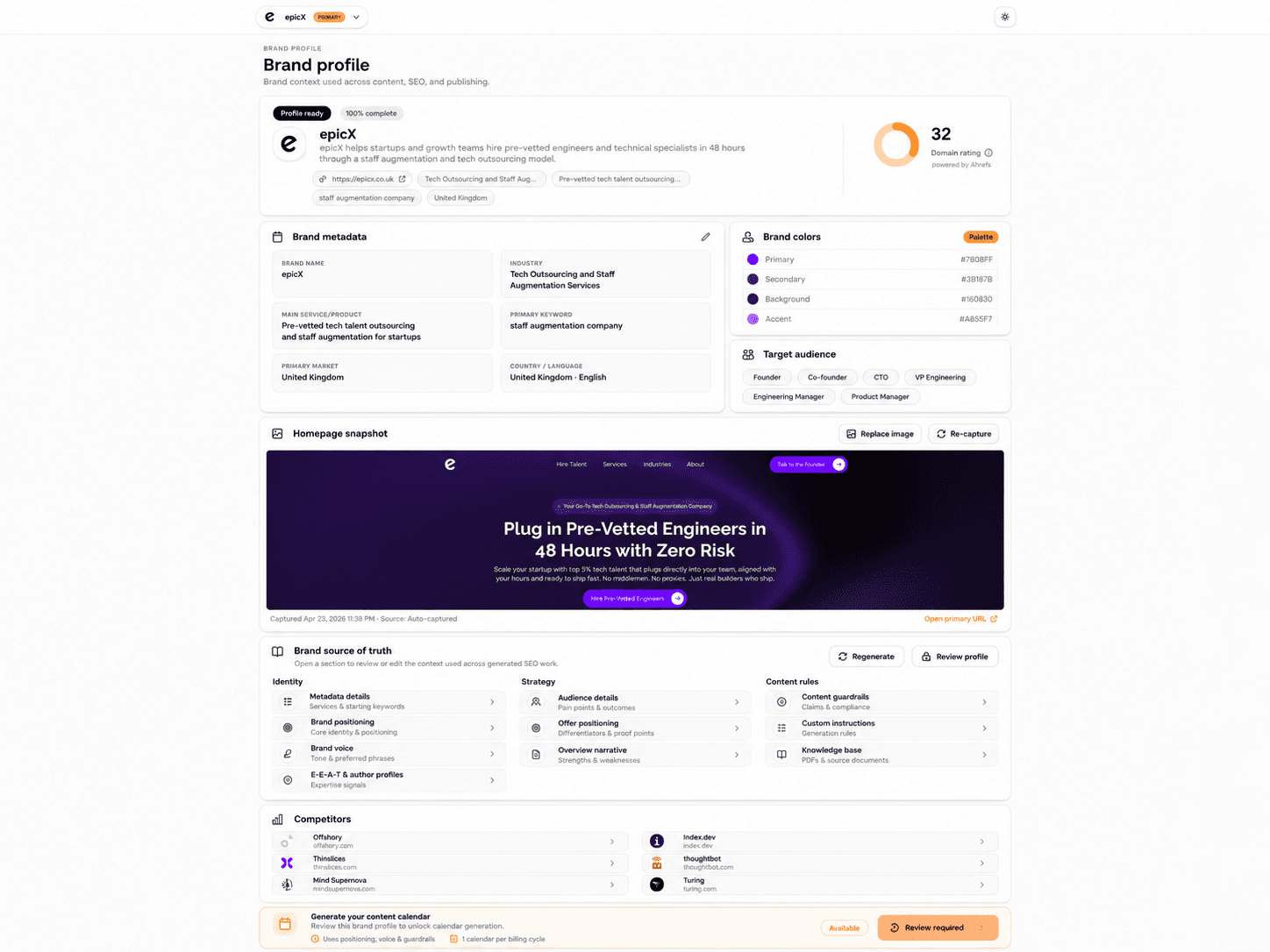
Your Brand Profile gives Keytomic the context it needs to create content that sounds and behaves like your brand. We redesigned the experience to reduce cognitive load and make important information easier to manage.
What changed
Priority brand metadata stays visible on the main screen.
Brand colors, target audience, and competitors are easier to review.
Secondary fields sit inside expandable sections until needed.
Editable fields are preserved more reliably when the profile updates.
Review the essentials first, then open additional fields when you need them. Your brand context stays easier to maintain as you work.
Review your Brand Profile in Keytomic →
A smoother, faster onboarding experience
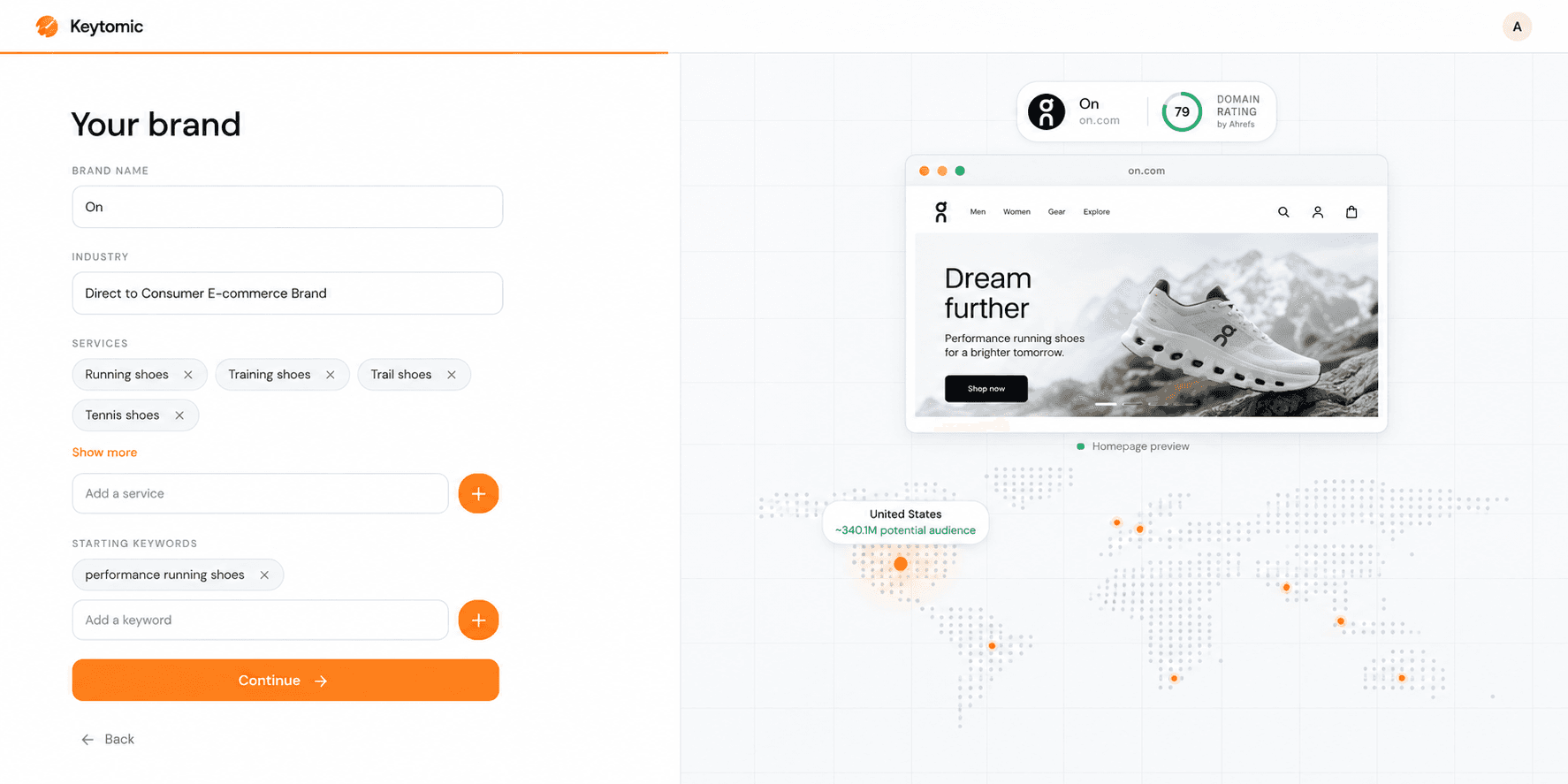
Improvement · September 1–15, 2026
Move from signup to your next step sooner.
We improved onboarding to remove the latency that was slowing down the first Keytomic experience. New users can move through the setup flow more smoothly, with less waiting between getting started and reaching the next step.
What improved
A smoother flow from signup through onboarding.
A faster path to checkout or the completed onboarding screen.
Under a minute to reach that point in most cases.
A full onboarding experience designed to take no more than two minutes.
The goal is to help you get through setup and into your SEO work with less friction.
A better Keytomic experience on mobile
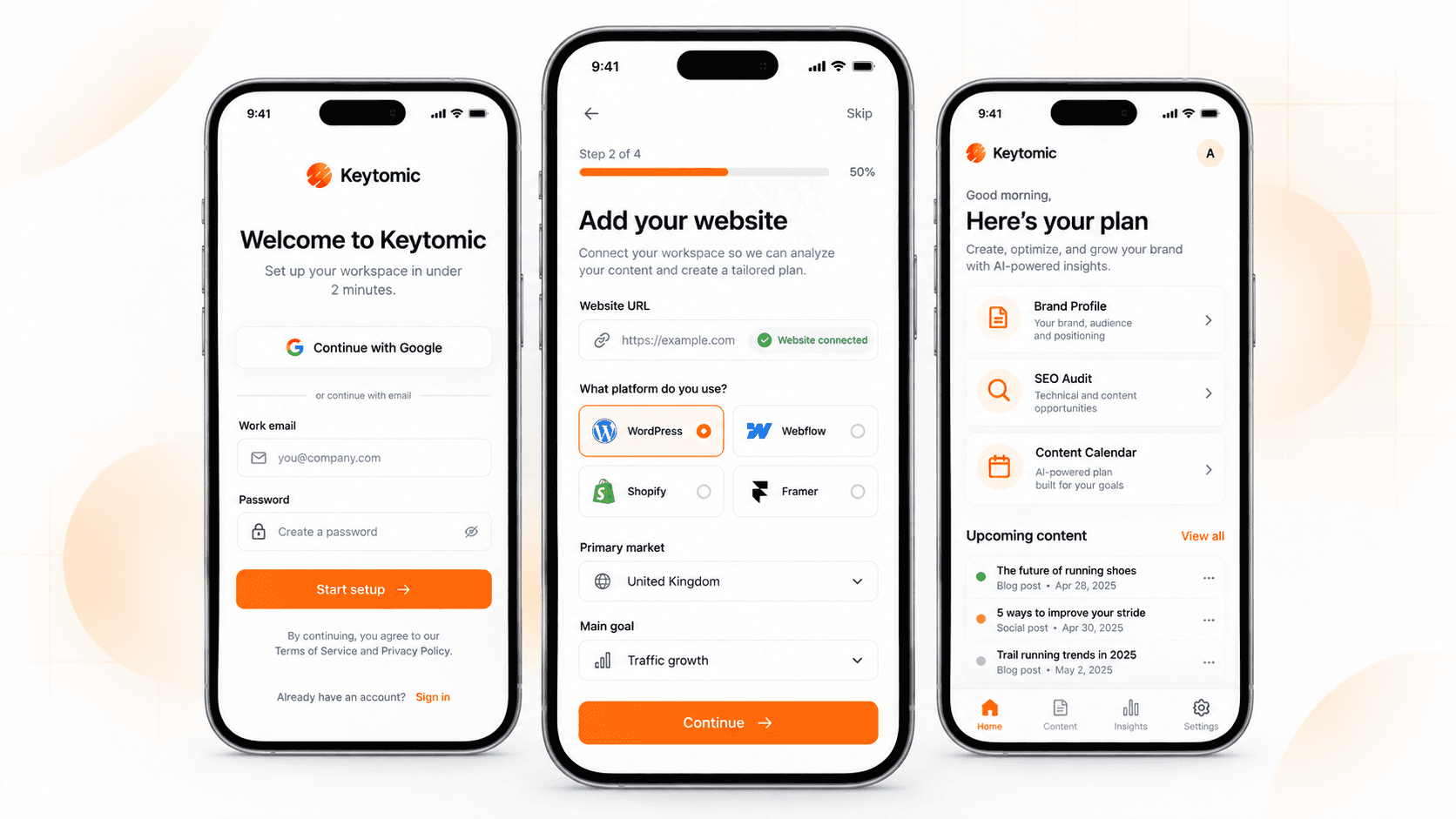
Improvement · September 1–15, 2026
Get started from your phone without fighting the interface.
More users discover Keytomic and sign up from their phones. We rebuilt signup and onboarding for smaller screens, alongside broader responsiveness improvements across the app.
What changed
Signup rebuilt for smaller screens.
Onboarding adapted for mobile users.
Broader mobile responsiveness improvements across the app.
The changes focus on the first experience: discovering the product, creating an account, and getting through setup. You can begin from a smaller screen with a layout designed for that journey.
Done-for-You SEO, available directly
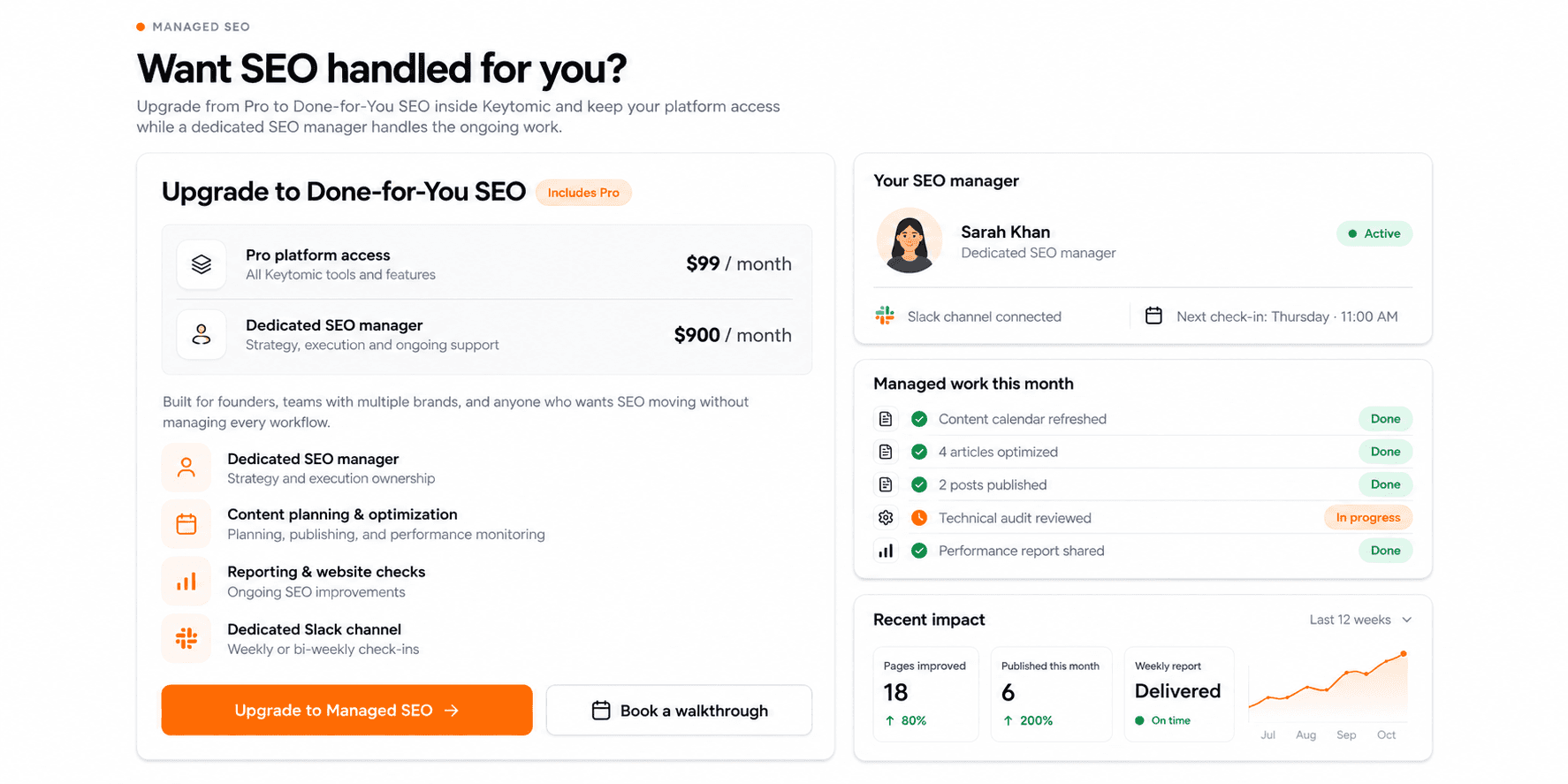
Managed SEO · September 1–15, 2026
Choose the platform plus a dedicated person managing the work.
Our Done-for-You plan is now available directly through the Keytomic upgrade flow for teams that prefer to hand over day-to-day SEO management.
What’s included
Everything in the $99 Pro plan.
A dedicated SEO manager for an additional $900 per month.
Strategy, execution, reporting, optimization, content planning, and publishing.
A dedicated Slack channel with weekly or bi-weekly check-ins.
This option is built for founders and teams who want SEO moving without managing every task themselves. The upgrade combines access to Keytomic with ongoing support for planning, publishing, and reviewing the work through a direct channel with your manager.
Everything We Shipped in August 2026
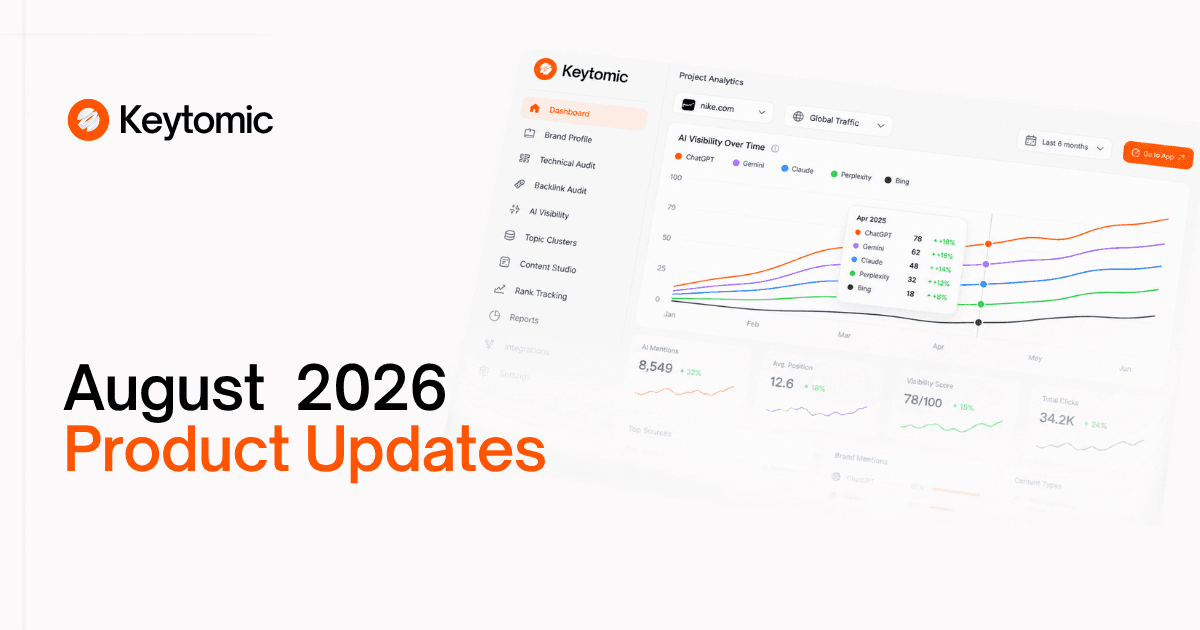
August 2026
Free AI Visibility Audit V2
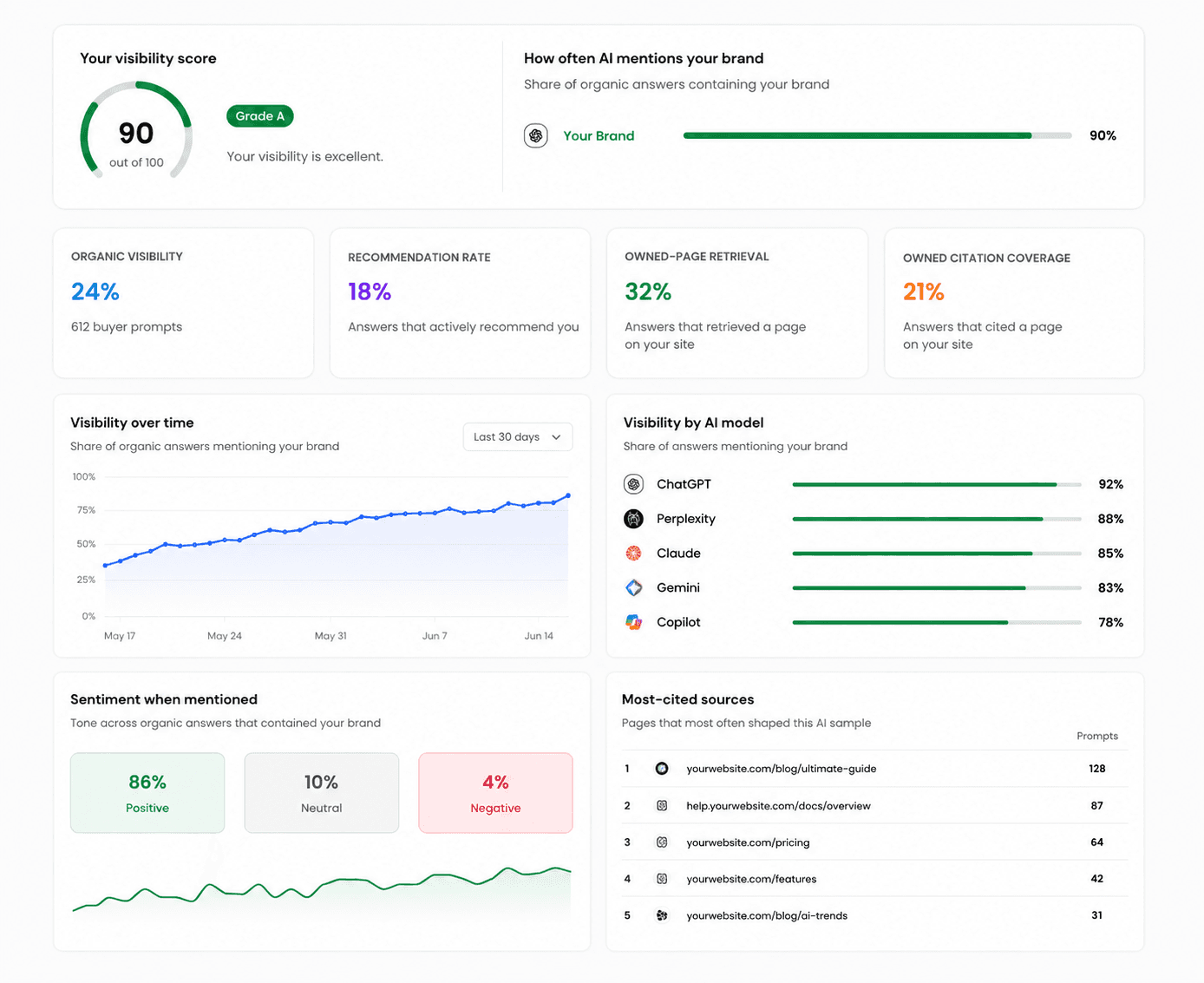
New Feature · August 27, 2026
See how visible your brand is across AI search.
AI search is becoming a core way customers discover brands, but most businesses still have no simple way to see where they appear, where they’re missing, or how they compare.
AI Visibility Audit V2 is now live and publicly available. It lets you measure your presence across AI search without setting up a full Keytomic project first.
What’s included
AI visibility analysis for your website and brand
Visibility observations across supported AI providers
A clearer view of where your brand is appearing
A foundation for identifying gaps in AI search visibility
A public audit experience that does not require a paid Keytomic plan
The audit is designed as the starting point for understanding whether AI systems are discovering and representing your brand.
Try the free AI Visibility Audit →
AI Visibility now covers more AI search engines
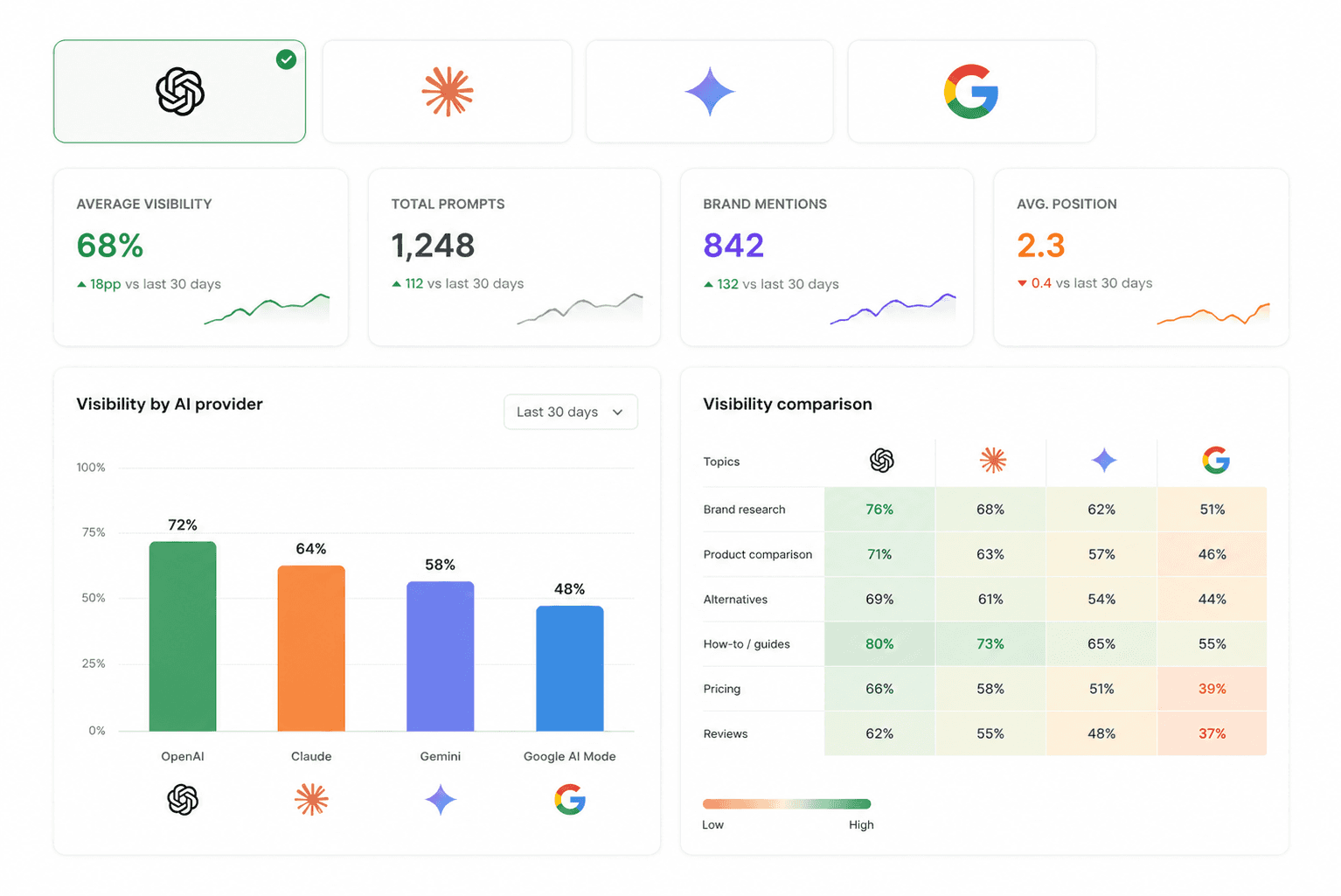
New Feature · August 27, 2026
Track visibility across OpenAI, Anthropic, Gemini, and Google AI Mode.
AI search is no longer one platform. Customers can discover your brand through ChatGPT, Gemini, Claude, Google AI Mode, and other AI-powered experiences. Tracking only one provider leaves major gaps.
Keytomic now supports AI visibility observations across:
OpenAI
Anthropic
Google Gemini
Google AI Mode
Why it matters
A brand can perform well in one AI system and poorly in another. Bringing multiple providers into the same workflow makes those differences easier to spot and act on.
Custom Image Studio
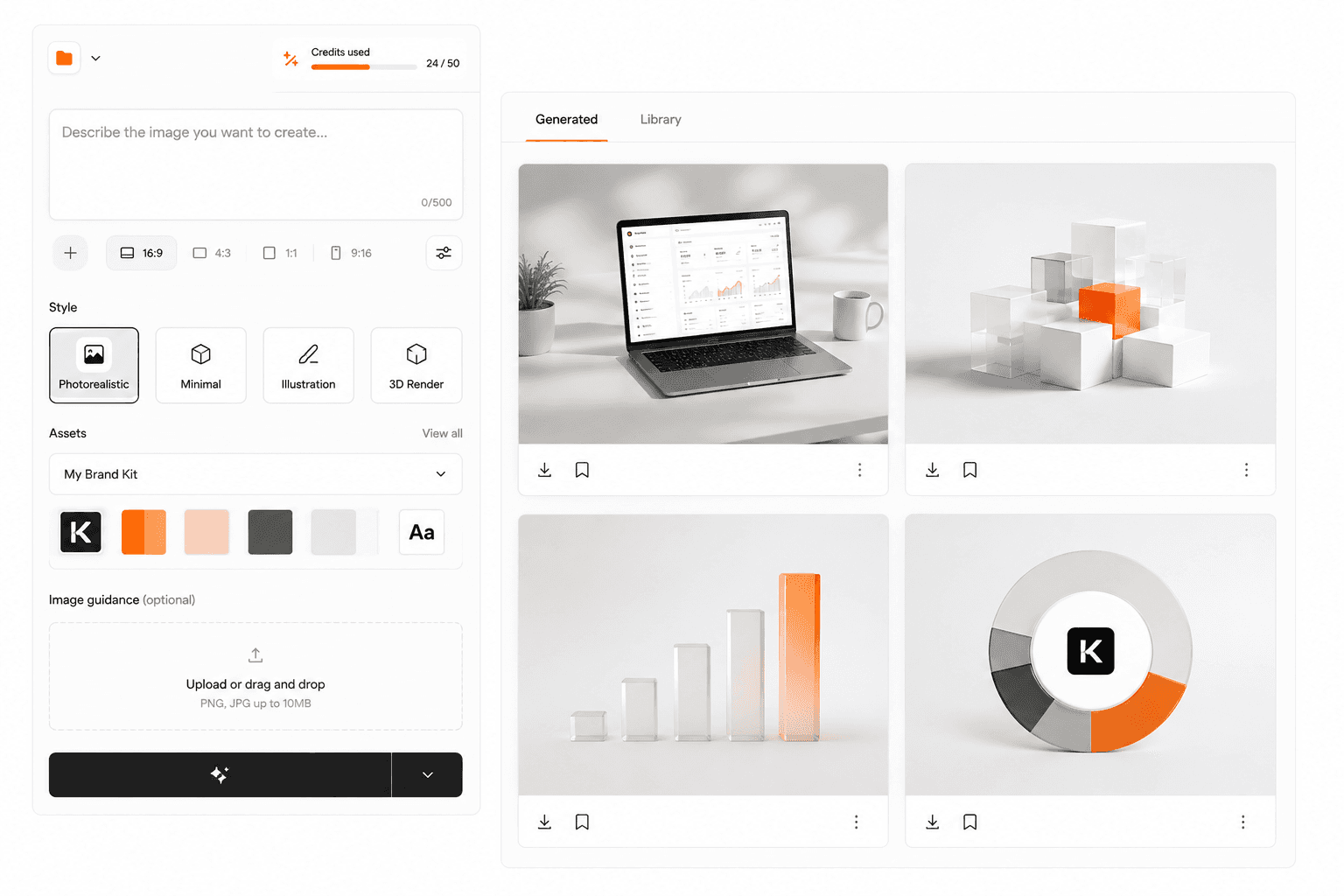
New Feature · August 27, 2026
Create branded images for your content without leaving Keytomic.
Your content shouldn’t look like it came from a generic AI generator.
Image Studio gives you a dedicated workspace inside Keytomic for generating custom, on-brand visuals for the content you’re already creating.
What’s new
Dedicated Image Studio inside Keytomic
Custom image generation for published content
Brand-oriented visual creation
A faster workflow from content creation to finished article
No need to switch tools for every article
Better content should look better too.
Author Profiles for E-E-A-T
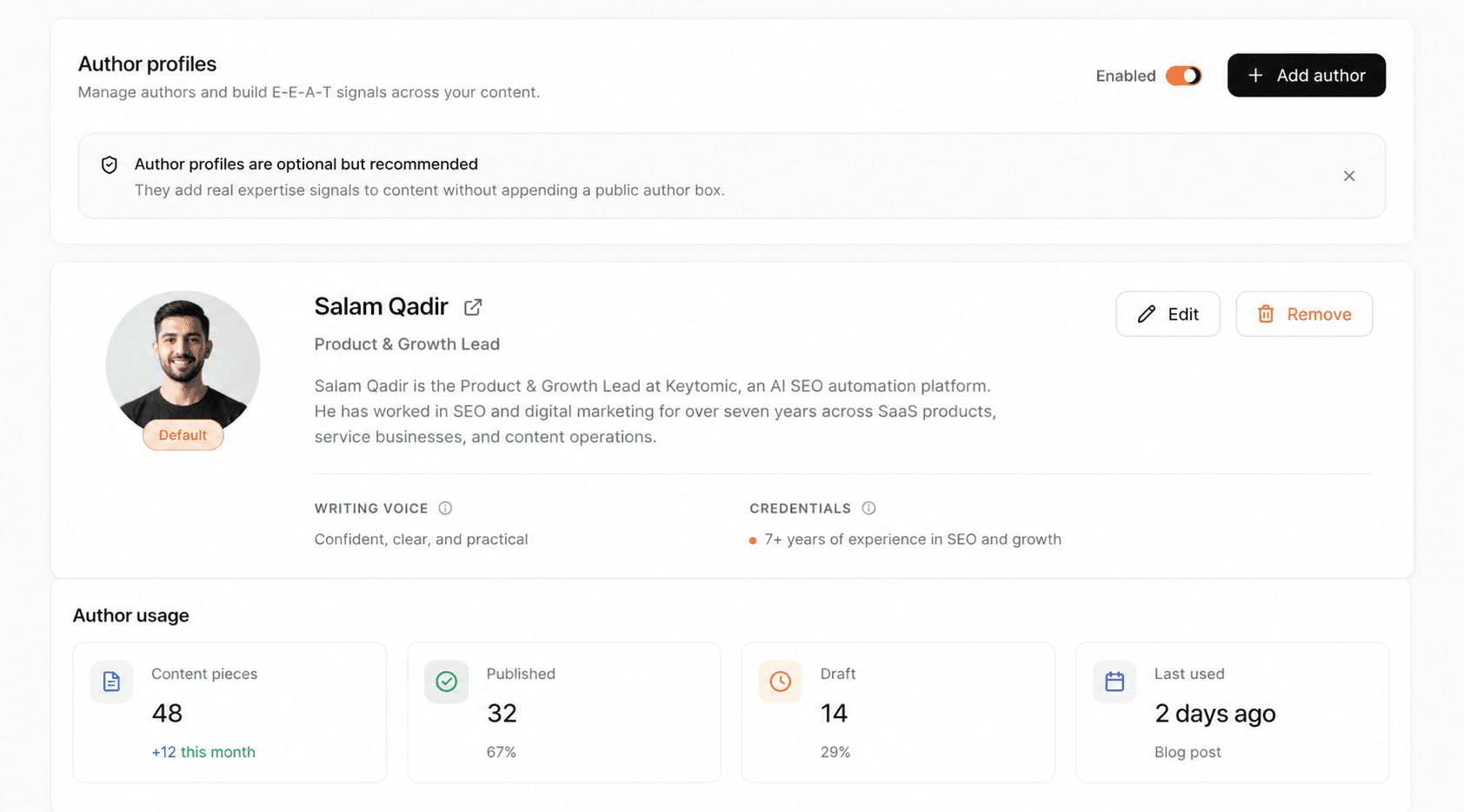
New Feature · August 27, 2026
Give your published content a real author identity.
Search engines and AI systems need more than text to judge credibility. Author identity is a key signal for expertise and trust.
Keytomic now supports Author Profiles so you can associate content with the people behind it.
You can define
Author name
Professional title
Author information
Author identity linked to published content
Instead of every article appearing anonymous, your content can carry a consistent, identifiable author.
Multi-Search Engine Distribution
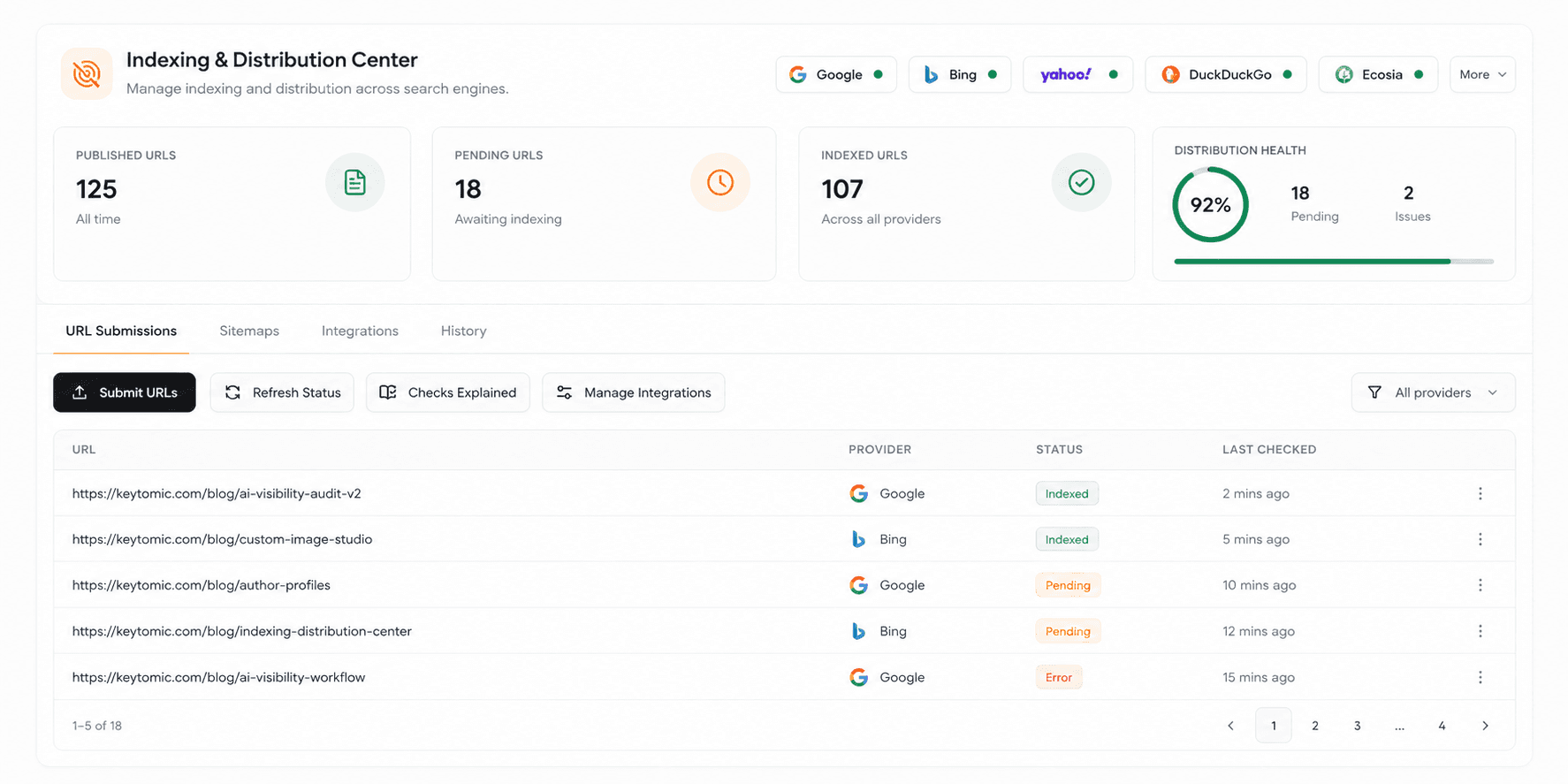
New Feature · August 27, 2026
Publish your content. Then help more search engines discover it.
Search visibility doesn’t stop at Google.
Keytomic now expands its indexing and distribution workflow with Bing Webmaster Tools integration, alongside refinements to the existing Google Search Console workflow.
The redesigned Indexing & Distribution Center gives you one place to manage how published content is submitted and monitored.
Bing integration includes
Bing Webmaster Tools OAuth connection
URL submissions to Bing
Sitemap submissions
Automatic Bing notification after publishing
Connection status inside Keytomic
Submission tracking
Indexing and distribution visibility
Once connected, Keytomic can help keep Bing informed about newly published content.
Redesigned Indexing & Distribution Center
Monitor submission results, indexing checks, warnings, errors, and search engine connection status in one place. We also refined the Google Search Console workflow to make distribution easier to manage.
Connect Bing Webmaster Tools →
A clearer project-analysis experience
Improvement · August 27, 2026
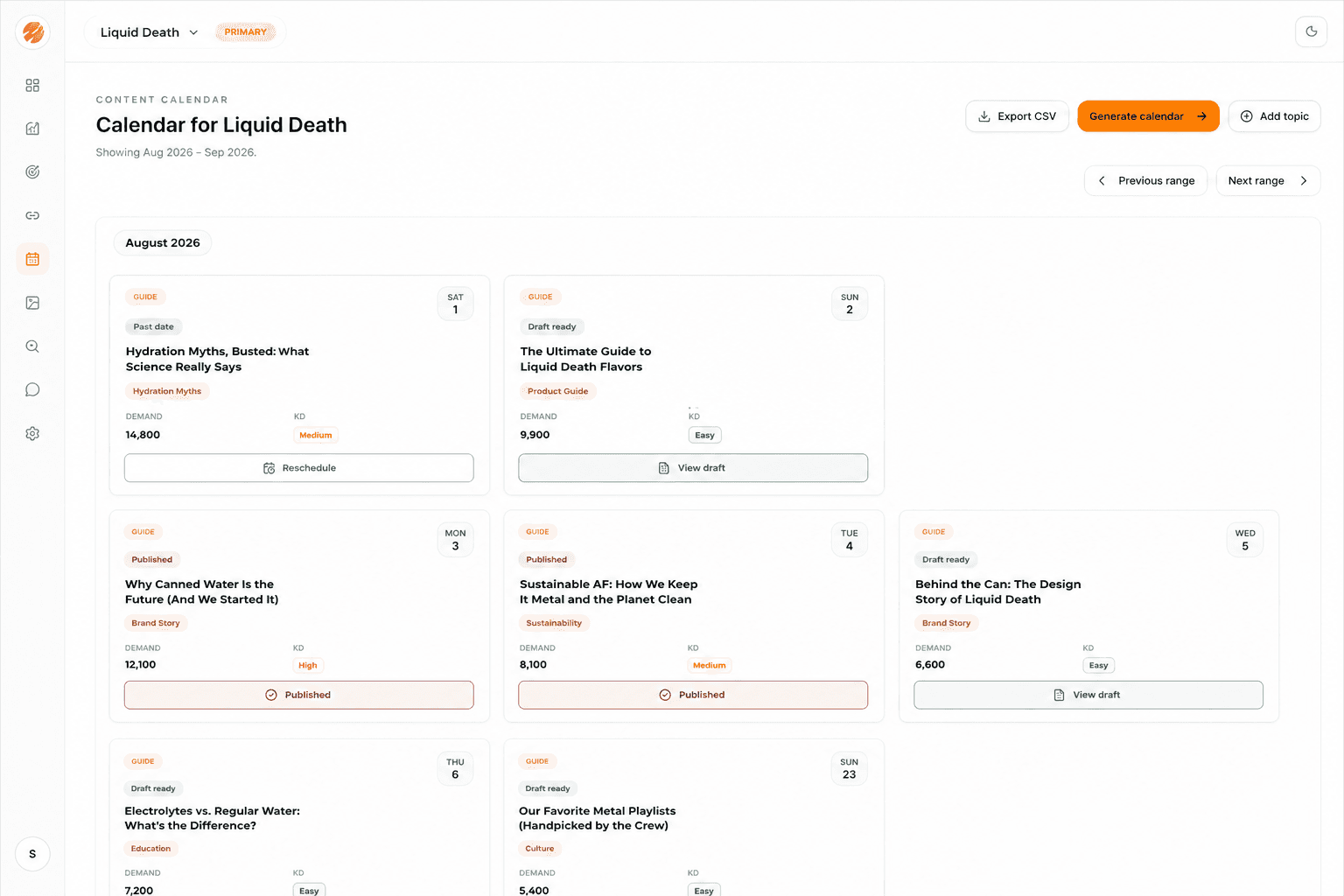
See what’s happening while Keytomic analyzes your project.
Large SEO projects involve significant analysis in the background. We redesigned the progress experience so it’s easier to understand what Keytomic is doing while it works through your website and project data.
Also improved
Minimized sidebar behavior for a cleaner workspace
Clearer project-analysis progress states
Removal of the persistent email-verification banner
The result is less friction between starting a project and getting to the work that matters.
Smarter AI observation and usage tracking
Improvement · August 27, 2026
More reliable visibility into how AI observations are measured and consumed.
As Keytomic expands the number of AI systems it can observe, we’ve upgraded the usage accounting that powers AI Visibility.
This creates a more reliable foundation for tracking observation usage, applying quotas, supporting additional providers, and scaling AI visibility workloads.
GPT-5.6 Luna model support
Improvement · August 27, 2026
Updated AI infrastructure to properly account for GPT-5.6 Luna usage and pricing.
This keeps model-specific usage and platform accounting aligned as AI provider models and pricing evolve.
Stronger integrations and search distribution
Improvement · August 27, 2026
Key improvements to the services that power Keytomic’s integrations, indexing, and automation.
New standalone scheduler service for more reliable automated workflows
Updated AI provider SDK dependencies
DataForSEO client upgraded from 2.0.12 to 2.1.0
New database infrastructure for Bing connections and submissions
AI Visibility data retention logic
Additional configuration tests and build fixes
These changes strengthen the foundation for AI visibility, indexing, and automated workflows.
Better lifecycle notifications
Improvement · August 27, 2026
Keytomic now supports lifecycle Slack notifications with approximate IP location context.
This gives teams clearer context around important lifecycle events while keeping location data approximate.
Free AI Visibility Audit
Are AI Assistants Recommending Your SaaS Yet?
See whether your brand shows up when buyers ask AI about your category, use cases, and competitors.
No signup. No card details.
“What are the best CRM tools for a 10-person sales team?”
“Compare HubSpot alternatives for an early-stage startup.”
“Which project management software works best for remote teams?”
“Best invoicing software for freelancers and small SaaS teams?”